Show HN: A CLI to avoid remembering HTTP status codes(github.com)
github.com
Show HN: A CLI to avoid remembering HTTP status codes
https://github.com/sterchelen/hssp
To understand the meaning of an HTTP status code and list all codes belonging to a specific class from your terminal.
40 comments
This looks good.
I use a bash function to load the MDN page for the status:
I use a bash function to load the MDN page for the status:
  function man-http() {
    code="$1"
    if [[ -z $code ]]; then
      echo "Usage: man-http <status code>"
      exit 0
    fi

    firefox "https://developer.mozilla.org/en-US/docs/Web/HTTP/Status/$code"
}i keep underestimating the power of bash. KISS!
From your description I thought for a second that you were somehow parsing the page :D
On that note, this is the shell alias I use to remember status codes (using htmlq https://github.com/mgdm/htmlq):
alias status_codes="curl --silent https://developer.mozilla.org/en-US/docs/Web/HTTP/Status | htmlq --text 'dt a code'"
    100 Continue
    101 Switching Protocols
    102 Processing
    103 Early Hints
    200 OK
    201 Created
    202 Accepted
    203 Non-Authoritative Information
    204 No Content
    205 Reset Content
    206 Partial Content
    ...
status_codes | grep ^2
Wow, how have i never heard of htmlq!?! Thanks for sharing your alias as well as teaching me another cool tool (htmlq)!
I took a slightly different approach to this problem.
I made a CLI tool (bash) that leverages imgcat (the one that comes with iTerm2) to display images (in my terminal) from http.cat that correspond to the code I'm wondering about as well as a link to the mozilla docs with more details if i need them.
seeing the cats injects a smile into the frustration around "what the heck is a 407?!"
https://github.com/masukomi/masuconfigs/blob/master/bin/http...
I made a CLI tool (bash) that leverages imgcat (the one that comes with iTerm2) to display images (in my terminal) from http.cat that correspond to the code I'm wondering about as well as a link to the mozilla docs with more details if i need them.
seeing the cats injects a smile into the frustration around "what the heck is a 407?!"
https://github.com/masukomi/masuconfigs/blob/master/bin/http...
I refer to HTTP Status codes all the time throughout the day and use Python's built-in http library:
  >>> from http import HTTPStatus
  >>> HTTPStatus.OK
  <HTTPStatus.OK: 200>
  >>> HTTPStatus(404)
<HTTPStatus.NOT_FOUND: 404>Here's a simple CLI interface to Python's HTTP status codes:
⌘ https://codeberg.org/kas/httperr
⌘ https://codeberg.org/kas/httperr
I was loving httpstatuses.com, but the domain has been recently sold and lost all the clean style that made it useful.
I sold httpstatuses.com (website and domain) in... 2016 I think, maybe 2017, and the acquirers kept it as-is until 2022. Someone (not me) recently relaunched the site (as it was opensource) under a new domain -- https://httpstatuses.io -- so if you can replace ".com" with ".io" in your muscle memory, you can get the original site!
Their blog post about reviving the project: https://jkulton.com/2022/reviving-httpstatuses
Their blog post about reviving the project: https://jkulton.com/2022/reviving-httpstatuses
[deleted]
"There's an app for that" now coming to your terminals...!
There's also http.cat.
You can actually just do without the keywords: it's easy to figure out what is intended since class will never reach 100, and code will never go under 100. Will make this more intuitive to use since there's nothing to remember.
I've had great success using this sort of know-your-data "smart" search on company-internal databases for customers. People like it because it's intuitive and they don't need to remember keywords or mess with dropdowns.
Also, why don't you just call it http?
I've had great success using this sort of know-your-data "smart" search on company-internal databases for customers. People like it because it's intuitive and they don't need to remember keywords or mess with dropdowns.
Also, why don't you just call it http?
The `http` command is taken by the popular HTTPie tool.
https://httpie.io/docs/cli/usage
https://httpie.io/docs/cli/usage
The CLI ways I already have installed:
    man HTTP::Status            # courtesy of Perl and HTTP::Status
pydoc requests.status_codes # because Python and requestsThank you for implementing 418.
I've always used this one:
https://www.httpstatuses.org/
P.S. For some reason I can't remember if 301 or 302 is the permanent one.
P.P.S. I hate the fact that 401 should be Unauthenticated (instead of Unauthorized), and 403 should be Unauthorized (instead of Forbidden).
https://www.httpstatuses.org/
P.S. For some reason I can't remember if 301 or 302 is the permanent one.
P.P.S. I hate the fact that 401 should be Unauthenticated (instead of Unauthorized), and 403 should be Unauthorized (instead of Forbidden).
I use https://webmachine.github.io/images/http-headers-status-v3.p... for that.
It's definitely not complete, but very helpful to decide which status code makes sense for a particular situation.
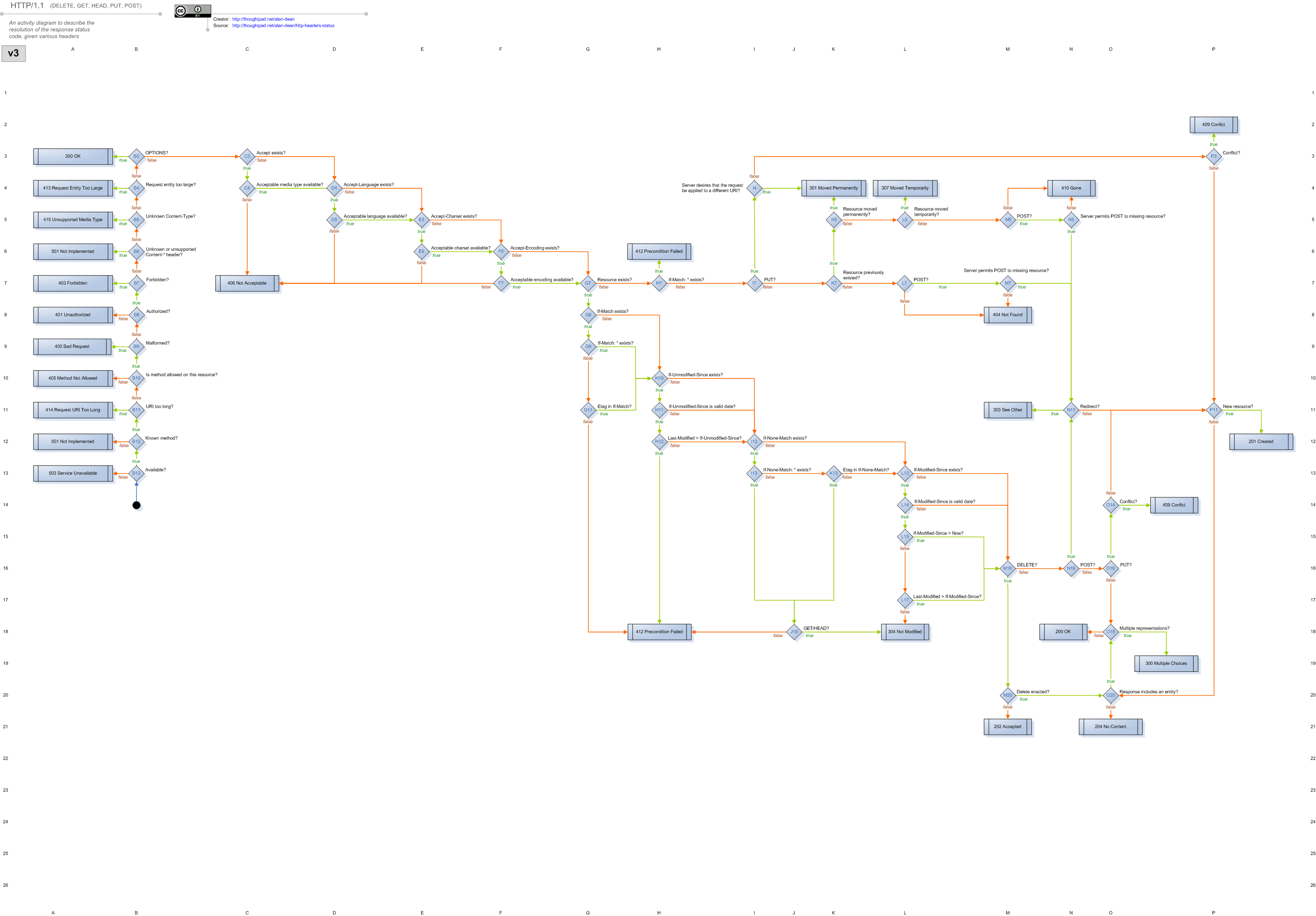
It's definitely not complete, but very helpful to decide which status code makes sense for a particular situation.
Nice work gathering all HTTP codes, but wouldn't this be simpler?
  lynx -dump https://developer.mozilla.org/en-US/docs/Web/HTTP/Status > HTTP-status-codes.txt
  grep 204 HTTP-status-codes.txt
grep 307 HTTP-status-codes.txtI use a little service I've written: https://http-status.fx-ttr.de/402
And just call it with curl
bookmark this page: https://en.wikipedia.org/wiki/List_of_HTTP_status_codes
Used to do "!wiki http status codes" to quickly get to that page.
Now I just go to http.cat.
Now I just go to http.cat.
I guess you can make the usage bit simpler by getting rid of "code" and "class" keywords
Why not simply do this?
$ hssp 204
$ hssp 2 -- lists everything under it
Why not simply do this?
$ hssp 204
$ hssp 2 -- lists everything under it
I'd prefer a man page than having to install separate tool :)
`man 404` would be really convenient. I could tolerate `man http-404` too.
For those that think that `man` is only about commands, we already have `man 7 ascii`.
For those that think that `man` is only about commands, we already have `man 7 ascii`.
Actually i think a website/service similar in concept to https://wttr.in would be amazing!
FYI: Successful is written without two L's.
Looks like a useful tool though :)
[deleted]
bmn__(3)