Intel Core I9-13900K and I5-13600K Review: Raptor Lake Brings More Bite(anandtech.com)
anandtech.com
Intel Core I9-13900K and I5-13600K Review: Raptor Lake Brings More Bite
https://www.anandtech.com/show/17601/intel-core-i9-13900k-and-i5-13600k-review
127 comments
Could please someone clear up the following for me: So his processor draws up to 335W. The core voltage is to my knowledge around 1.3V, so this processor draws over 255A. How is this possible? Shouldn't these tiny structures inside the processor immediately evaporate with currents like these? I mean, they are not superconductors, they must have some resistance? Why do I have to spend so much money on AWG4 cables for my battery storage, and somehow these rules do not apply to microprocessors?
Your #4 cables do not dissipate heat nearly as effectively as the liquid cooling solution they're using on this test bed [1].
For this processor to continue dissipating 335W without overheating, it needs to dissipate that 335W of heat energy into hundreds of cubic feet of air every minute. Six fans push and pull the air through hundreds of tiny fins, which are conducting heat out of liquid coolant continuously pumped through tubes soldered to those fins and through a giant copper waterblock millimeters from the point where this heat is produced. And even with all that, it probably can't actually run at 335W continuously.
You don't have a $200 cooling solution on every foot of your battery cables, they're wrapped in PVC or silicone, buried in conduit, in plastic wire wrapping, or through insulation in a wall cavity.
As an EE, those rules are painfully applied to microprocessors, such that a ton of PCB design energy, mechanical constraints on packaging, and other costs are spent removing that heat. You have the convenience of just buying the recommended AWG4 cables and it just works, regardless of the severely sub-optimal thermal design you might employ when running that cable.
In theory your batteries could pass 255A through a single strand of bare copper from an Ethernet cable for a few tens of milliseconds before it went into thermal runaway and liquefied/evaporated. Remove that heat fast enough (liquid nitrogen?) and you could run tiny cables to your battery storage.
[1] https://www.ekwb.com/shop/ek-aio-elite-360-d-rgb
For this processor to continue dissipating 335W without overheating, it needs to dissipate that 335W of heat energy into hundreds of cubic feet of air every minute. Six fans push and pull the air through hundreds of tiny fins, which are conducting heat out of liquid coolant continuously pumped through tubes soldered to those fins and through a giant copper waterblock millimeters from the point where this heat is produced. And even with all that, it probably can't actually run at 335W continuously.
You don't have a $200 cooling solution on every foot of your battery cables, they're wrapped in PVC or silicone, buried in conduit, in plastic wire wrapping, or through insulation in a wall cavity.
As an EE, those rules are painfully applied to microprocessors, such that a ton of PCB design energy, mechanical constraints on packaging, and other costs are spent removing that heat. You have the convenience of just buying the recommended AWG4 cables and it just works, regardless of the severely sub-optimal thermal design you might employ when running that cable.
In theory your batteries could pass 255A through a single strand of bare copper from an Ethernet cable for a few tens of milliseconds before it went into thermal runaway and liquefied/evaporated. Remove that heat fast enough (liquid nitrogen?) and you could run tiny cables to your battery storage.
[1] https://www.ekwb.com/shop/ek-aio-elite-360-d-rgb
Thank you. While that makes sense, it still blows my mind... These things are absolute marvels of engineering and really push the laws of physics. Next to 255A of current, these things can almost reach 6GHz frequency. Just incredible.
Heh, yes, sort of. Sure it's over 5 GHz. But their somewhere around 19 pipeline stages. So 19 parts of the chip, do 1/19th of the work of a single instruction, under ideal conditions (data is in registers, functional unit is available, etc). So something as simple as a=b+c gets split into 19 pieces.
Sadly waiting on cache (l1, l2, and l3), main memory (4 32 bit channels approximately 100ns away), missed branch predictions, etc is fairly common. So delivered performance is much less than you'd think form a 6 way issue @ 6 GHz * 8 to 16 cores. Sadly we are still stuck at 128 bit wide memory, as a result even the most parallel of codes like cinebench go up by 50% when you double the number of cores.
Sadly waiting on cache (l1, l2, and l3), main memory (4 32 bit channels approximately 100ns away), missed branch predictions, etc is fairly common. So delivered performance is much less than you'd think form a 6 way issue @ 6 GHz * 8 to 16 cores. Sadly we are still stuck at 128 bit wide memory, as a result even the most parallel of codes like cinebench go up by 50% when you double the number of cores.
Like half the pins in a CPU socket are ground and power. The copper planes carrying power from the VRM to the socket are massive. Wide and thick. The CPU die itself has large networks of metal interconnect that get finer and finer to supply smaller and smaller areas, much like our circulatory system. You can see these on die shots of older parts as well, e.g. http://www.righto.com/2016/12/die-photos-and-analysis-of_24.... notice the thick traces which start to fan out quickly.
Also consider that there's 10+ billion transistors for those 200 A to go around.
Also consider that there's 10+ billion transistors for those 200 A to go around.
Not my expertise, but I assume this is (one of) the reasons why CPU packages have so many dedicated power delivery pins, like in https://www.techpowerup.com/img/RJC7aj7xUhLmvxVD.jpg
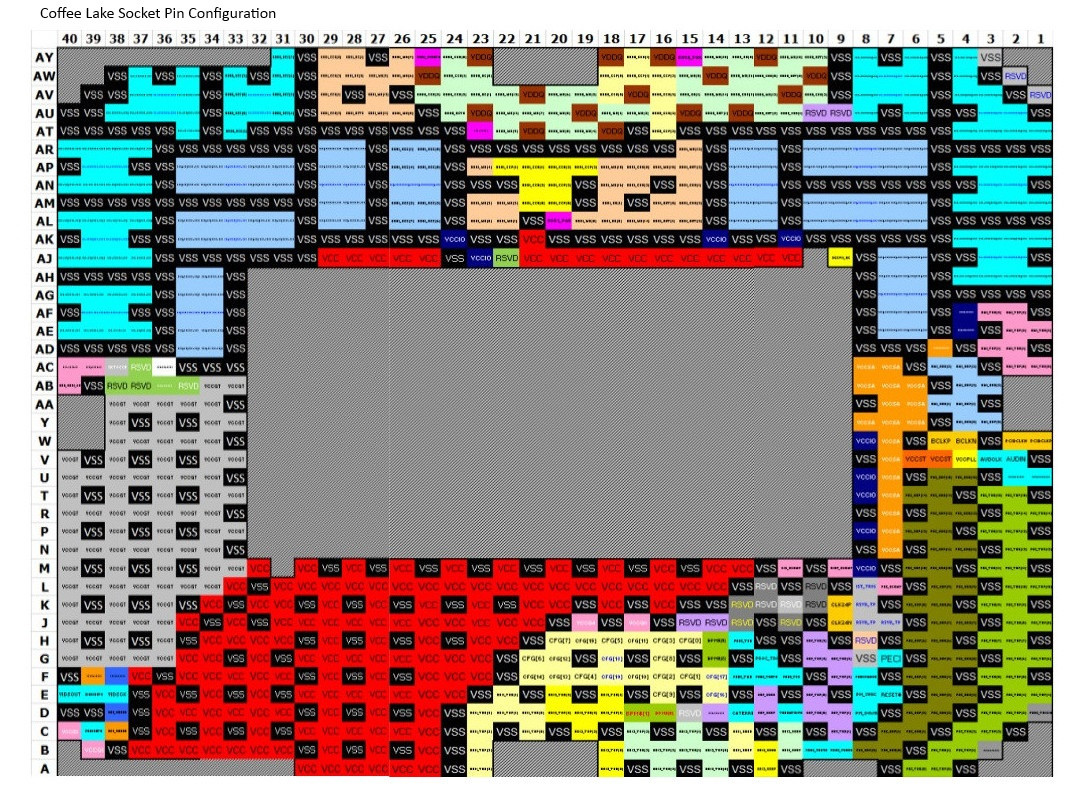
The biggest reason is that the cpu is only carrying those 250A for about 1 inch. Resistance is directly proportional to distance.
I read somewhere that the energy density in modern cpus is 10% of the surface of the sun. Don't quote me on that.
A cubic meter of sun produces ... 0.27 watts!
The sun's output is 3.8 x 10^26 watts and the volume is 1.4 x 10^27 cubic meters
Surface of the sun is 6.09×10^12 km^2, which comes out to 62.4 watts per square mm. The AM5 socket is 40x40mm, so that would be 100,000 watts of the sun's surface.
The sun's output is 3.8 x 10^26 watts and the volume is 1.4 x 10^27 cubic meters
Surface of the sun is 6.09×10^12 km^2, which comes out to 62.4 watts per square mm. The AM5 socket is 40x40mm, so that would be 100,000 watts of the sun's surface.
I'd be curious to see how one measures peak energy density in a modern CPU.
As far as power density goes, the i9-13900K seems to be 335W / (257 mm^2 die area * ~1mm water thickness) ≈ 1.3e9 W/m^3. The power density of the sun in comparison is around 2.8e2 W/m^3, roughly what you'd find at the center of a large pile of compost (although the temperature at the sun's core may be just a wee bit higher).
As far as power density goes, the i9-13900K seems to be 335W / (257 mm^2 die area * ~1mm water thickness) ≈ 1.3e9 W/m^3. The power density of the sun in comparison is around 2.8e2 W/m^3, roughly what you'd find at the center of a large pile of compost (although the temperature at the sun's core may be just a wee bit higher).
I'm pretty sure it's much higher. The sun isn't very energy dense.
1.3v blows me away, at 7nm transistors were typically using 0.8v due to oxide breakdown at high voltages. I wonder how they can run at 1.3v and not kill those tiny transistors gates.
Dynamic power being proportional to voltagr squared will hurt perf/watt significantly also.
Dynamic power being proportional to voltagr squared will hurt perf/watt significantly also.
Both AMD and Intel are competing for bragging rights, but they are both pushing the power envelope to accomplish it. The Raptor Lake processors take it to the next level. The law of diminishing returns kicks in whenever a new version is something like 20% faster but requires 25% more power in order to do it.
There are times when I will certainly sacrifice cost for speed, but most of the time I want my CPU to churn out pretty good performance while being frugal on the power budget.
There are times when I will certainly sacrifice cost for speed, but most of the time I want my CPU to churn out pretty good performance while being frugal on the power budget.
I do think TechSpot[0] (aka Hardware Unboxed) has a good chart[1] that highlights some differences in power consumption utilized to achieve performance.
Notice at 185W, the Ryzen 9 7950X is churning out about 36% higher performance than the Core i9 13900K. The Intel CPU, however, is then able to continue drawing up to 335W!
At their respective peak scores, the i9 is using over 70% more power.
[0] https://www.techspot.com/review/2552-intel-core-i9-13900k/
[1] https://static.techspot.com/articles-info/2552/bench/Power_S...
Notice at 185W, the Ryzen 9 7950X is churning out about 36% higher performance than the Core i9 13900K. The Intel CPU, however, is then able to continue drawing up to 335W!
At their respective peak scores, the i9 is using over 70% more power.
[0] https://www.techspot.com/review/2552-intel-core-i9-13900k/
[1] https://static.techspot.com/articles-info/2552/bench/Power_S...
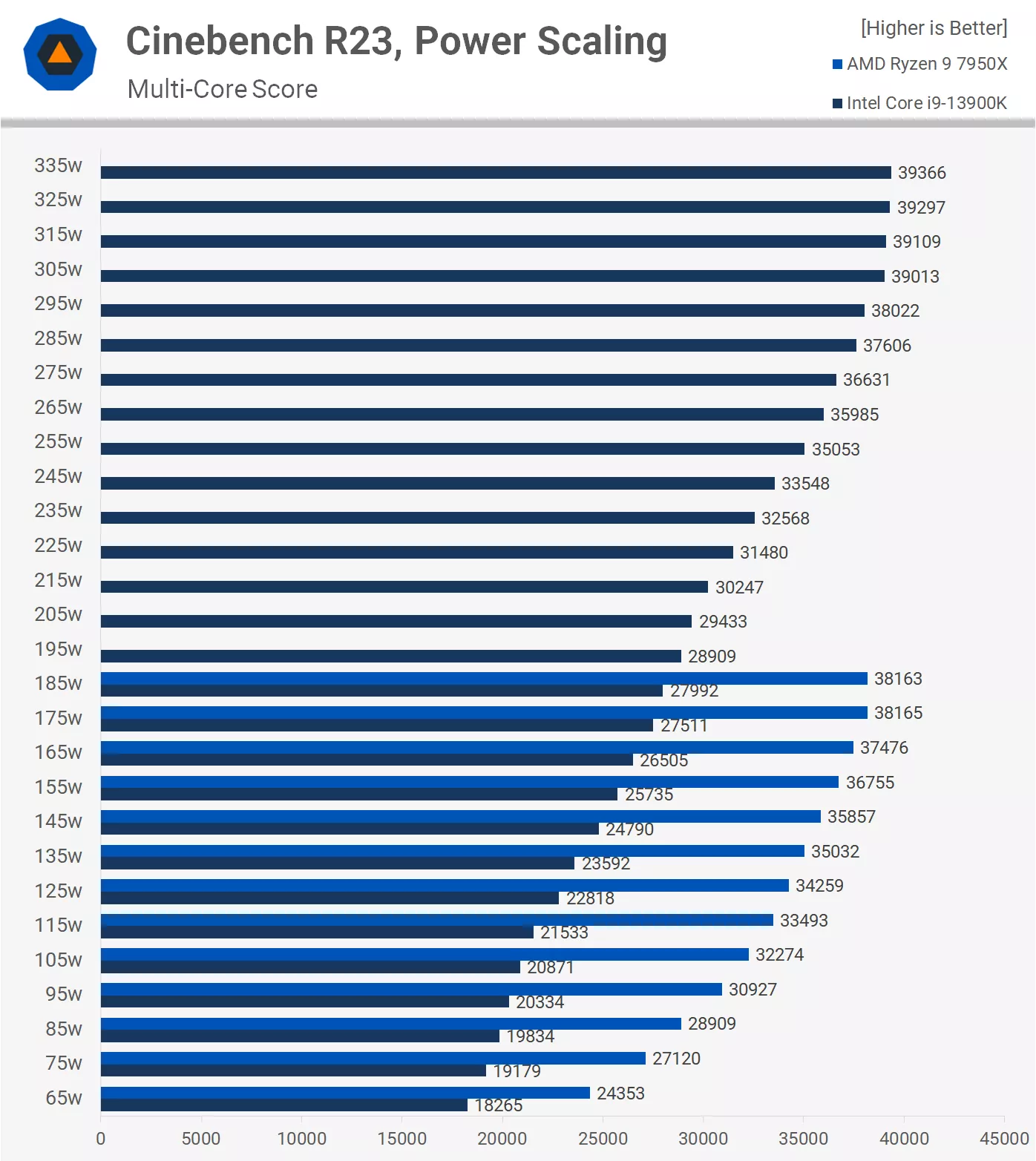
I'm mostly interested in numbers under 100W, maybe even 65W, since I plan to down-clock my (future) Zen 4 machine.
AMD is killing it with efficiency there.
AMD is killing it with efficiency there.
I've seen several posts showing that the most minor of underclocks and undervolts produce substantial power savings and minimal performance differences.
Apparently Intel's trying really hard on an old process to get the performance crown, forcing AMD to clock higher than they'd like to compete. It's ridiculous that they double the power for 10% performance. But the nice thing is you can half the power and take the 10% hit.
Also note that the 7900/7900X are dual chiplet design that has a significant power impact. The 7700x and below have a single chiplet and saves power, and also increases single thread perf. If you look at the gaming benchmarks the 7700x is often better than the 7900x, not to mention all the Intel chips except the top of the line i9.
So if you buy the 7700x and underclock just a bit you should have a very efficient desktop.
Apparently Intel's trying really hard on an old process to get the performance crown, forcing AMD to clock higher than they'd like to compete. It's ridiculous that they double the power for 10% performance. But the nice thing is you can half the power and take the 10% hit.
Also note that the 7900/7900X are dual chiplet design that has a significant power impact. The 7700x and below have a single chiplet and saves power, and also increases single thread perf. If you look at the gaming benchmarks the 7700x is often better than the 7900x, not to mention all the Intel chips except the top of the line i9.
So if you buy the 7700x and underclock just a bit you should have a very efficient desktop.
> the 7900/7900X are dual chiplet design
This is a minor terminology mix-up. The term you want here is "CCX". Each CCX holds multiple chiplets.
See https://www.tomshardware.com/reviews/amd-ccx-definition-cpu-... for more details.
EDIT: It does look like my own information on this was rusty.
A "chiplet" is not an individual core, but a trimmed down die that does not have a memory controller. A "CCX" contains cores (within a chiplet) and L3 cache.
https://www.hardwaretimes.com/amd-ccd-and-ccx-in-ryzen-proce...
> The basic unit of a Ryzen processor is a CCX or Core Complex, a quad-core/octa-core CPU chiplet with a shared L3 cache.
This is a minor terminology mix-up. The term you want here is "CCX". Each CCX holds multiple chiplets.
See https://www.tomshardware.com/reviews/amd-ccx-definition-cpu-... for more details.
EDIT: It does look like my own information on this was rusty.
A "chiplet" is not an individual core, but a trimmed down die that does not have a memory controller. A "CCX" contains cores (within a chiplet) and L3 cache.
https://www.hardwaretimes.com/amd-ccd-and-ccx-in-ryzen-proce...
> The basic unit of a Ryzen processor is a CCX or Core Complex, a quad-core/octa-core CPU chiplet with a shared L3 cache.
> For the Ryzen 3000-series processors, CCX refers to a four-core grouping inside of each core chiplet die (CCD). For example, an AMD CPU with 8 cores will have a CCD with two 4-core CCXs.
From that link, your statement does not appear accurate. Multiple CCX's appear on a given Core Chiplet Die. There are indeed two vs one core chiplets on different Ryzen designs (plus the IOD).
From that link, your statement does not appear accurate. Multiple CCX's appear on a given Core Chiplet Die. There are indeed two vs one core chiplets on different Ryzen designs (plus the IOD).
check out https://arstechnica.com/gadgets/2022/10/intel-i9-13900k-and-... - they power limited both 7000 and raptor lake models and surprisingly, amd doesn't respect the power limits - at 65W it's burning 90W and intel is respecting the 65W limit, 7.868Whr vs 8.58Whr to complete the same task (h264 encoding in handbrake), so interestingly intel on a 2 node disadvantage is more power efficient if you set your power limits.
Yes - comparing the above 65W score from AMD to Intel's 145W score highlights the stark difference!
That techspot review triggers me. Why does the guy go on and on about how impractical the 13900 is compared to the 12900, since the 13900 is "throttling"? Yeah, the 13900K hits a steady state of 5300MHz with all cores active and stays that way forever, which is great! The apparently "more practical" 12900K hits 4900MHz on all cores and does the job slower but it's "not throttling". This makes zero sense.
The popular tech press understanding of how closed-loop control systems work is just REALLY annoying.
The popular tech press understanding of how closed-loop control systems work is just REALLY annoying.
And it is important to remember the AMD IOD is still on N6 or similar to current Intel 7 2nd gen. ( i.e On I/O level AMD and Intel are on the same Node ) Even if Intel was on Intel 5 or TSMC N5 equivalent it still likely wouldn't be using similar power as AMD.
So I am actually surprised at how well AMD Zen 4 is doing. It used to be if you want MT you go with AMD, at the expense of ST. Now this is no longer the case.
If you care about energy efficiency, just buy AMD Zen 4.
So I am actually surprised at how well AMD Zen 4 is doing. It used to be if you want MT you go with AMD, at the expense of ST. Now this is no longer the case.
If you care about energy efficiency, just buy AMD Zen 4.
I think this mix of processes is testament to the fact analog is not scaling, and high speed IO has a lot of analog/phys. So having an IOD on 3nm would cost more and probably consume similar power, at least for the phys. Of course you will always get sub systems on that die that would benefit, but overall its likely a net loss.
but I do think Raptor lake consunes less power than Zen4 when idling e.g. web browsing, code editing etc. I would want to see power usage for VS code + Firefox etc.
I use high performance only for seconds when compiling.
I use high performance only for seconds when compiling.
Zen's idle performance is absolutely atrocious due to the I/O die that constantly draws 20 watts. Pretty sure Intel's stuff in total draws less than half that.
Intel invested a crapload of money in laptop CPU's and low idle which is one of the reason they dominated that market for so long - I would guess that it bled over into desktop as well.
Are you talking about last years zen3? That was a common complaint.
From https://www.tweaktown.com/reviews/10195/amd-ryzen-5-7600x-ze...
"Power consumption is measured directly from the dual eight-pin connections. At peak, the 7600X pulls an impressive 130W, and during idle, it was down to 18w."
Sounds pretty good, especially considering its at the "dual eight-pin" power supply connection. Not laptop class, but pretty good for a high performance desktop.
From https://www.tweaktown.com/reviews/10195/amd-ryzen-5-7600x-ze...
"Power consumption is measured directly from the dual eight-pin connections. At peak, the 7600X pulls an impressive 130W, and during idle, it was down to 18w."
Sounds pretty good, especially considering its at the "dual eight-pin" power supply connection. Not laptop class, but pretty good for a high performance desktop.
Anecdotally, my Zen 3 5900X rated at 105W TDP, sitting kind of idle (with a dozen or so programs open, task manager showing 1% usage) is drawing about 11W.
I do seem to recall a AGESA update (motherboard firmware) that did managed to reduce the IOD power usage when idle. Sad that it was months after most of the reviews came out.
12900K idles at 8.5 watts. 18 watts is awful.
Measured where? At the power supply?
Not sure what exactly is included in the 18 watts via the power supply connector. Wasn't sure if it was all CPU, or CPU+Dimms, or maybe the entire motherboard.
Not sure what exactly is included in the 18 watts via the power supply connector. Wasn't sure if it was all CPU, or CPU+Dimms, or maybe the entire motherboard.
The 8 pin connector goes to the CPU. The big ATX 12V connector goes to everything else.
For idle power consumption, watt usage from wall is better measurement.
Benchmark with same power limit like this is what I'd like to know. I also want to know wall watt usage for them, to verify it's limited correctly, and how much chipset/other components uses power.
See this comment: https://news.ycombinator.com/item?id=33278470
Not sure if it gets closer to the testing approach you're looking for?
Not sure if it gets closer to the testing approach you're looking for?
This is great but I also want kill-a-watt measurement
how costly is in the US that diference (of power consumption) in a year?
> The law of diminishing returns kicks in whenever a new version is something like 20% faster but requires 25% more power in order to do it.
How often do you run your CPU at 100% load across all cores? For me, idle power draw dominates my overall power consumption. The difference between a 100W peak CPU and a 300W peak CPU basically doesn’t matter across the course of my day, because even compiling large codebases doesn’t last very long.
I say this because I bought into the AMD efficiency hype a few years ago, ditching my Intel workstation for an AMD workstation. Yet according to my home energy monitor, my office circuit consumption actually went up, not down.
Further investigation revealed that my AMD desktop had significantly higher idle power than the old Intel one. Given that most of my day is spent typing, not pegging the CPU at full load, this nets out to higher overall power consumption.
So I’m back to not caring about peak power consumption. If the Intel CPU wants to pull 300W for the 60 seconds that my compile takes, go for it. What I’ll really be looking at is the idle power usage.
How often do you run your CPU at 100% load across all cores? For me, idle power draw dominates my overall power consumption. The difference between a 100W peak CPU and a 300W peak CPU basically doesn’t matter across the course of my day, because even compiling large codebases doesn’t last very long.
I say this because I bought into the AMD efficiency hype a few years ago, ditching my Intel workstation for an AMD workstation. Yet according to my home energy monitor, my office circuit consumption actually went up, not down.
Further investigation revealed that my AMD desktop had significantly higher idle power than the old Intel one. Given that most of my day is spent typing, not pegging the CPU at full load, this nets out to higher overall power consumption.
So I’m back to not caring about peak power consumption. If the Intel CPU wants to pull 300W for the 60 seconds that my compile takes, go for it. What I’ll really be looking at is the idle power usage.
Yes.
For my desktop, I only care if it's possible to make it quiet overall.
For a laptop, I care about performance given the more restrictive cooling restraints of the form factor, and battery life (but that's secondary since I can usually use it plugged in anyway.)
So efficiency matters (including under load), but it can't be your only deciding factor in deciding what to buy and use.
For my desktop, I only care if it's possible to make it quiet overall.
For a laptop, I care about performance given the more restrictive cooling restraints of the form factor, and battery life (but that's secondary since I can usually use it plugged in anyway.)
So efficiency matters (including under load), but it can't be your only deciding factor in deciding what to buy and use.
If you play any game then it's really not 60 seconds.
And then having a processor drawing this kind of power has impact on you PDU, cooling system, case...
mATX for instance makes nearly no sense with that kind of power use. But who wants a huge tower on their desk anymore?
And then having a processor drawing this kind of power has impact on you PDU, cooling system, case...
mATX for instance makes nearly no sense with that kind of power use. But who wants a huge tower on their desk anymore?
Gamers love BIG RGB TOWER on the desk, isn't it?
If you play games, your room gets very noticeably hotter because on a high end pc you'll be at 500w while gaming. And this could be hours long.
Yea this generation power limiting in bios will be a must for high end.
Both 7950X and 13900k don't lose much performance from limiting power to "reasonable" wattage.
Both 7950X and 13900k don't lose much performance from limiting power to "reasonable" wattage.
Seeing what the 7950X does even when limited to 65W is pretty exciting, and it will be very interesting to see what AMD does with their mobile line of processors come January!
What does limiting the power usage do to the single core performance?
It's a desktop chip, why do we care? If I need the compute power I couldn't care less about power consumption or heat. The thing will mostly sit idle anyway and sip a tiny fraction of that.
It seems to me like people only care about peak power consumption when AMD and Apple win those benchmarks.
It seems to me like people only care about peak power consumption when AMD and Apple win those benchmarks.
GPUs are doing the same thing. Every generation does bring more efficiency, but also includes an increase of power consumption. I'd like to see a line that aims to reduce power consumption by a meager amount (1-5%) each generation, while continuing to push performance higher and just be an "Energy Efficient" model. Like here's our baseline.. 6 core, 12 threads @ 5.2GHz, let's see how power efficient we can get those specs over the next 5 generations, and how much performance increase we can also squeeze without drawing more power or making it bigger.
I've been thinking about these tradeoffs lately. There's an argument one hears that you can "future proof" by buying top of the line and then not having to upgrade as often. I think that's always been a bit flawed, but it feels like with the massive thermal tradeoffs these top end parts are making it less true than ever.
Heh, don't think that ever made sense. When a machine is 5 years old you don't particularly care if it's the low, mid, or high end CPU, they are all slow. However not buying ram is a killer and often results in replacing a perfectly good machines.
I don't fully agree. My 9-year-old 3rd gen Xeon is still plenty usable, barely slower than a "normal" i5 10th gen for doing Rust dev.
My work PC with a 4th gen i5 has been unusable even for basic tasks for a few years, despite the 16 GB of RAM and SSD drive. Even moving windows around and stuff is sluggish.
My work PC with a 4th gen i5 has been unusable even for basic tasks for a few years, despite the 16 GB of RAM and SSD drive. Even moving windows around and stuff is sluggish.
> Both AMD and Intel are competing for bragging rights, but they are both pushing the power envelope to accomplish it.
Yes and no. AMD just released the 5800X3D which is just a teensy bit slower than Intel's top-dog...but it uses a bit more than one third the power the I9-12900KS and 13900K do.
Right now you can get a blisteringly-fast (for gaming and other certain specific workloads) AMD CPU with power consumption a skooch over 100W. It yields a nearly 25% increase in framerate on some games, which is huge, and does it at less power usage than the non-stacked-cache variant: https://youtu.be/hBFNoKUHjcg?t=515
You're right about the next generation of Ryzen processors using more power, but nobody knows how much, partly because AMD using some silly nonsense to calculate "TDP", and review units aren't out yet: https://youtu.be/hVnJbiYOCq4?t=363
Yes and no. AMD just released the 5800X3D which is just a teensy bit slower than Intel's top-dog...but it uses a bit more than one third the power the I9-12900KS and 13900K do.
Right now you can get a blisteringly-fast (for gaming and other certain specific workloads) AMD CPU with power consumption a skooch over 100W. It yields a nearly 25% increase in framerate on some games, which is huge, and does it at less power usage than the non-stacked-cache variant: https://youtu.be/hBFNoKUHjcg?t=515
You're right about the next generation of Ryzen processors using more power, but nobody knows how much, partly because AMD using some silly nonsense to calculate "TDP", and review units aren't out yet: https://youtu.be/hVnJbiYOCq4?t=363
The Ryzen 7 5800X3D was released in early April 2022. It's rated for a 105W TDP, and draws up to about 190-195W depending on workload[0].
In 1080p gaming (useful for exaggerating the CPU bottleneck), the 13900K outperforms the 5800X3D by about 11%[1].
Review units of "next generation of Ryzen processors" have been out since late September when they became available to buy, so you can read reviews and find out their actual power usage[2]. The Ryzen 9 7950X is shown to push system power consumption up to 355W while running Blender.
(TechSpot reviews linked simply because they include power consumption in their reviews.)
[0] https://www.techspot.com/review/2449-amd-ryzen-5800x3D/
[1] https://www.techspot.com/review/2552-intel-core-i9-13900k/
[2] https://www.techspot.com/review/2535-amd-ryzen-7950x/
In 1080p gaming (useful for exaggerating the CPU bottleneck), the 13900K outperforms the 5800X3D by about 11%[1].
Review units of "next generation of Ryzen processors" have been out since late September when they became available to buy, so you can read reviews and find out their actual power usage[2]. The Ryzen 9 7950X is shown to push system power consumption up to 355W while running Blender.
(TechSpot reviews linked simply because they include power consumption in their reviews.)
[0] https://www.techspot.com/review/2449-amd-ryzen-5800x3D/
[1] https://www.techspot.com/review/2552-intel-core-i9-13900k/
[2] https://www.techspot.com/review/2535-amd-ryzen-7950x/
if youre buying a 13900 for 1080p gaming youre throwing away money anyways. ltt includes the 5800x3d in their numbers for comparisons at resolutions people buying super high end cpus actully want to drive.
At idle, where the cpu spends most of it's time, the Intel chips are winning significantly.
At idle, where the cpu spends most of it's time, the Intel chips are winning significantly.
>At idle, where the cpu spends most of it's time, the Intel chips are winning significantly.
Well, by 3W for an entire system. Which isn't worth worrying about in my opinion.
So personally, I'd be looking at other specs to help me decide between them.
https://www.guru3d.com/articles_pages/intel_core_i9_13900k_r...
Well, by 3W for an entire system. Which isn't worth worrying about in my opinion.
So personally, I'd be looking at other specs to help me decide between them.
https://www.guru3d.com/articles_pages/intel_core_i9_13900k_r...
I put a 5800X3D in my gaming PC. It actually runs kind of hot and draws more power than I expected from the reviews, especially at idle.
For day to day use (including non-gaming work) my old Intel CPU consumes less power overall because the idle power was so much lower.
Peak TDP isn’t everything.
For day to day use (including non-gaming work) my old Intel CPU consumes less power overall because the idle power was so much lower.
Peak TDP isn’t everything.
Besides power vs performance, there's also the cost of buying into the platform, AMD's latest chips aren't selling too well because cost of entry is pretty high with expensive motherboards and expensive RAM (plus enthusiast gamers waiting for the 3d stacked cache chips coming next year).
Intel is seeming likely to have the pricing advantage this time due to their compatibility with DDR4, IIRC slightly lower prices and support for existing motherboards.
Intel is seeming likely to have the pricing advantage this time due to their compatibility with DDR4, IIRC slightly lower prices and support for existing motherboards.
For an idea of price differences, cheapest available parts to build a 6-core, 16GB (2x8) barebones system (motherboard, RAM, CPU) from Microcenter:
AMD: Total $615
B650 motherboard $230
Ryzen 5 7600X (6C) $300
DDR5-4800 $85
Intel: Total $439
B660M motherboard (DDR4 only) $90
Core i5 13600k (6P + 8E) $300
DDR4-3200 $49
The motherboards are really killing it. DDR5 isn't such a problem. Yes it's more expensive, but higher performing. But their entry level motherboards need to come way down in price!
AMD: Total $615
B650 motherboard $230
Ryzen 5 7600X (6C) $300
DDR5-4800 $85
Intel: Total $439
B660M motherboard (DDR4 only) $90
Core i5 13600k (6P + 8E) $300
DDR4-3200 $49
The motherboards are really killing it. DDR5 isn't such a problem. Yes it's more expensive, but higher performing. But their entry level motherboards need to come way down in price!
DDR5 isn't such a problem for fresh builds, but for example, I already have 64GB of DDR4 so I'd rather use that and let DDR5 improve and have prices come down further before switching, so Intel is very tempting (not that I strictly NEED to upgrade) as I'd only have to upgrade CPU and motherboard.
I suspect board makers have upped prices a lot because AM5 will be another long-lived platform, so they wanna compensate for selling fewer boards per customer relative to Intel.
> plus enthusiast gamers waiting for the 3d stacked cache chips coming next year)
They're already here - the 5800X3D or whatever it's called - and there's a significant performance jump in a bunch of games.
It is being released for the same cost as the non-stacked version of the chip, which has since come down in price. There are some downsides, like not being overclockable, so for workloads that don't benefit from the extra cache (which are many), it's not advantageous.
https://www.youtube.com/watch?v=hBFNoKUHjcg
Edit: I apologize for not being more specific in a casual internet forum discussion, so as to make clear that I was simply pointing out that there are also some 3d cache chips already in the market.
I mistakenly thought this was intuitively obvious to casual observers. Praise be that neogodless was available to prevent HN readers from being led astray.
In the future, I will be more careful and exacting in my wording.
I have been appropriately chided, and will not transgress again.
Thank you for correcting me, good sir.
They're already here - the 5800X3D or whatever it's called - and there's a significant performance jump in a bunch of games.
It is being released for the same cost as the non-stacked version of the chip, which has since come down in price. There are some downsides, like not being overclockable, so for workloads that don't benefit from the extra cache (which are many), it's not advantageous.
https://www.youtube.com/watch?v=hBFNoKUHjcg
Edit: I apologize for not being more specific in a casual internet forum discussion, so as to make clear that I was simply pointing out that there are also some 3d cache chips already in the market.
I mistakenly thought this was intuitively obvious to casual observers. Praise be that neogodless was available to prevent HN readers from being led astray.
In the future, I will be more careful and exacting in my wording.
I have been appropriately chided, and will not transgress again.
Thank you for correcting me, good sir.
Parent comment is talking about Zen 4 / Ryzen 7000 generation part(s) with the 3D cache, which has not been released yet, but is on the roadmap.
FWIW I didn't downvote you
It seems like both CPUs and GPUs this generation are going to push the power requirements to absolutely ridiculous heights for very minimal gains in performance. Sure, it doesn't take much work for a tinkerer to modify the settings, reduce voltages, and get something still quite powerful with considerable power savings, but that's the tinkerers. The CPUs and GPUs coming to people out of the box are going to be chugging power. These chips coming in prebuilts from system integrators for the people that just want to get work done are going to be as well.
I think Apple is probably too conservative with their power limits on their Mac Studio (maybe that's something they're saving for the Mac Pro) but I'd prefer that to this nonsense being the default.
I think Apple is probably too conservative with their power limits on their Mac Studio (maybe that's something they're saving for the Mac Pro) but I'd prefer that to this nonsense being the default.
Are those concerns even reasonable?
My CPU runs most of the day at around 5-20% usage
And it reaches top usage when I run some relatively new game for like a hour a week at best
Thus, the point is: why power usage at highest usage is that important?
I'd say power usage for the most common CPU usage is most important for majority of the people (for data center it'd be different)
My CPU runs most of the day at around 5-20% usage
And it reaches top usage when I run some relatively new game for like a hour a week at best
Thus, the point is: why power usage at highest usage is that important?
I'd say power usage for the most common CPU usage is most important for majority of the people (for data center it'd be different)
These sorts of CPUs are probably more likely to be bought by people who use them heavily, rather than sit idle for hours and hours. Obviously there will always be the Whale who surfs the web but has to buy a 13900k, but most people aren't dropping this sort of dough if they don't need the horsepower.
I can spend several hours on a weekend night gaming, and my GPU and CPU, depending on the game, are going half to full tilt. Typically ~350W, and that doesn't include my two monitors. When it's not in active use, it's asleep - I rarely leave it idling for more than ~30min before I put it in sleep mode. I'd say it probably spends 25% of its life under load.
This and the prior generation I9s use 2-3x the wattage of current generation AMD CPUs...couple that with NVIDIA 4000 series cards hitting 600W and you could have an intel 13900k w/4090 gaming rig using around 1000W, not including PSU efficiency losses or monitor(s). We're talking "you might need a dedicated circuit if you're on 100-120VAC and want anything else on that circuit" territory; it wouldn't surprise me if people start hiring electricians to switch circuits over to 208v.
I can spend several hours on a weekend night gaming, and my GPU and CPU, depending on the game, are going half to full tilt. Typically ~350W, and that doesn't include my two monitors. When it's not in active use, it's asleep - I rarely leave it idling for more than ~30min before I put it in sleep mode. I'd say it probably spends 25% of its life under load.
This and the prior generation I9s use 2-3x the wattage of current generation AMD CPUs...couple that with NVIDIA 4000 series cards hitting 600W and you could have an intel 13900k w/4090 gaming rig using around 1000W, not including PSU efficiency losses or monitor(s). We're talking "you might need a dedicated circuit if you're on 100-120VAC and want anything else on that circuit" territory; it wouldn't surprise me if people start hiring electricians to switch circuits over to 208v.
how does gaming for several hours on weekends add up to your PC being at load 25% of it's life? think that through. you'd need to spend 42 hours/week gaming for that to be correct, literally gaming like it's a full-time job. that's not unheard of, but it's not common and it's certainly not healthy.
What? Turning your pc OFF means it's not running
You can use PC for 4 hours/week, so 3h gaming per week = 75%
That's what I believe s/he meant
You can use PC for 4 hours/week, so 3h gaming per week = 75%
That's what I believe s/he meant
Minimal gains? RTX 4090 is almost double the performance of 3090.
If you reduce the power target of the RTX4090 to 60% you still get 90% of the performance[0]. This is becoming the norm for new hardware it seems.
[0]: https://youtu.be/60yFji_GKak?t=1020
[0]: https://youtu.be/60yFji_GKak?t=1020
For some raytraced games, the rest it's more like 20-30% improvement
What's strange with GPUs specifically is how nVidia has aggressively pushed power up with very little performance increase. With RTX 30 cards you could reduce the power target a fair bit with minimal performance loss, and with the RTX 4090 you can reduce the power consumption by almost 50 % or so and only loose single digit FPS. It's a weird part of the perf/power curve to pick for stock.
Ryzen 7000 has an ECO mode that seems to be quite effective for gaming related work.
https://www.reddit.com/r/Amd/comments/xp5yj5/eco_mode_is_ver...
https://www.reddit.com/r/Amd/comments/xp5yj5/eco_mode_is_ver...
[deleted]
I don't really get this argument. if you're putting a PC together yourself, you're certainly capable of turning down the PL2 limit. so are the OEMs like dell.
I'd rather have the product ship near the top of it's v/f curve than risk my warranty getting it there myself.
I'd rather have the product ship near the top of it's v/f curve than risk my warranty getting it there myself.
> I don't really get this argument. if you're putting a PC together yourself, you're certainly capable of turning down the PL2 limit. so are the OEMs like dell.
Tuning power profiles down to something reasonable is much harder than putting together a computer. You overestimate the competency of DIYers. System integrators aren't going to go out of their way to reduce the performance of their systems.
Enthusiasts should carry the burden of tuning their systems to eke out its maximum performance to the point of massive diminishing returns. That should not be the default profile.
Tuning power profiles down to something reasonable is much harder than putting together a computer. You overestimate the competency of DIYers. System integrators aren't going to go out of their way to reduce the performance of their systems.
Enthusiasts should carry the burden of tuning their systems to eke out its maximum performance to the point of massive diminishing returns. That should not be the default profile.
In what way is a one-line command harder than assembling an entire PC? Maybe the Linux distros should expose this more prominently, but you can change the RAPL parameters on the fly to suit yourself.
it's really not that complicated. PL2 is two settings in most bioses, a power limit and a max duration for that limit. sure, you could spend hours optimizing with all kinds of tweaks, but if you just want your cpu never to exceed 150W for more than 120 seconds, it takes a couple minutes to configure that.
but that's kinda missing the larger point. if you care more about power consumption than performance, you aren't the target audience for K-suffix parts anyway. these parts are specifically marketed to enthusiasts.
but that's kinda missing the larger point. if you care more about power consumption than performance, you aren't the target audience for K-suffix parts anyway. these parts are specifically marketed to enthusiasts.
I honestly have no idea why anyone uses the BIOS to set power limits. Intel, in their infinite wisdom, has exposed the relevant MSRs and they can be changed at any time. I feel like the BIOS is the worst possible place to set this, especially since changing it to suit your workload without rebooting is so valuable.
Example: I currently have my 12th-gen Core configured in a peculiar way that caps the all-core turbo clock rate to 4100MHz, but this leads to shorter project build times because it leaves thermal overhead sufficient for the single-threaded link to hit 5200MHz earlier and longer.
Example: I currently have my 12th-gen Core configured in a peculiar way that caps the all-core turbo clock rate to 4100MHz, but this leads to shorter project build times because it leaves thermal overhead sufficient for the single-threaded link to hit 5200MHz earlier and longer.
It's easy for me but you underestimate PC DIY population. AMD's precision boost override looks great for this.
Many of these CPUs (I'm tempted to say "the vast majority") will be sold in prebuilt systems. Even for enthusiasts CyberPowerPC, Maingear, etc. sell lots of systems.
Probably because they have a very mediocre cooling solution in it (I am guessing here based on their previous designs)
Hopefully the new Mac Pro is better
Hopefully the new Mac Pro is better
Disappointing that with all of this power available, ECC is only supported on W680 motherboards which are impossible to find from 1st party sellers.
For someone who just doesn't know -- what are the useful use cases for ECC? Who benefits from it?
Part of it is to track and fix the occasional bit flip. Said flips can cause data corruption, crashing processes, and crashing machines.
However it's also very useful to just know when a particular failure causes issues. So you know that the 3rd of 4 dimms died, instead of tracking down frequent crashed that might be power supply, motherboard, cpu, any dimm, etc.
Linus Torvalds recently lost time thinking he had an unreliable kernel when a 2+ year old dimm just went bad.
However it's also very useful to just know when a particular failure causes issues. So you know that the 3rd of 4 dimms died, instead of tracking down frequent crashed that might be power supply, motherboard, cpu, any dimm, etc.
Linus Torvalds recently lost time thinking he had an unreliable kernel when a 2+ year old dimm just went bad.
You benefit from cosmic rays not randomly corrupting your data in memory.
Mostly hosting but many find the lockout of it to "workstation" chipsets annoyingly arbitrary particularly when many off-the-shelf AM4 motherboards can use ECC memory without issue. The inability to use it elsewhere is comparatively arbitrary.
Theres an actual phenomenon known as bitrot, where over time, copies and storage, files degrade by having their bits flip. This can apparently accelerate during the process of a file being transferred (whether from the internet to a drive or ram or to a drive or vice versa), bits can be misread because of the speed and breadth they come in at. Ecc prevents this.
Unfortunately, it doesn't prevent it but reduces the chance.
Even with ECC memory regular data integrity checks (or scrubs) are vital for detecting bit rot.
True, but those data integrity checks are built into the motherboard/BIOS and happen without any user (or OS) intervention.
[deleted]
Nuclear engineers and anyone else who want bragging rights.
Note that all DDR5 chip supports limited error correction, it's better than nothing.
Ecc is not compatible with Intels k series overclocking
It looks like ECC is supported on K series processors according to Intel Ark.
https://ark.intel.com/content/www/us/en/ark/products/230496/...
https://ark.intel.com/content/www/us/en/ark/products/230496/...
It won't overclock but it will function
Here are some decent slides with power limits from der8auer
Power limit 90W: https://youtu.be/H4Bm0Wr6OEQ?t=280
A power limit scaling graph in 20W steps with Cinebench R20: https://youtu.be/H4Bm0Wr6OEQ?t=910
The default settings on both AMD and intel are such a shame when you can offer 5-10% less performance for a major decrease in power consumption.
Power limit 90W: https://youtu.be/H4Bm0Wr6OEQ?t=280
A power limit scaling graph in 20W steps with Cinebench R20: https://youtu.be/H4Bm0Wr6OEQ?t=910
The default settings on both AMD and intel are such a shame when you can offer 5-10% less performance for a major decrease in power consumption.
AMD will have a lot of problems on the low end looking at 7600X vs 12600k performance and most likely will be destroyed in the upper-middle after 12700k reviews goes live looking at 12600k vs 7700x.
Pretty weird that roles changes and now Intel is dominating low end and AMD is trying hard to dominate high end.
Pretty weird that roles changes and now Intel is dominating low end and AMD is trying hard to dominate high end.
Intel is winning in low end and high end, just not in power efficiency.
In games both 7000 Ryzens and 13 gen Intel are overpriced. A tuned 12th gen Intel or Ryzen 7 5800X3D will almost match them.
Also value overclocking is back - cheap boards like MSI MAG B660M Mortar Max Wifi DDR4 and AsRock B660M PG Riptide can overclock non-K Intel CPUs. Combined with say an i5 12400f overclocked to 5.1GHz they are providing amazing performance per dollar.
Also value overclocking is back - cheap boards like MSI MAG B660M Mortar Max Wifi DDR4 and AsRock B660M PG Riptide can overclock non-K Intel CPUs. Combined with say an i5 12400f overclocked to 5.1GHz they are providing amazing performance per dollar.
> In code compilation Intel beats AMD.
How do you come to that conclusion? Here's a Chromium Compile Benchmark in which the 7950x beats the 13900k. https://youtu.be/P40gp_DJk5E?t=593
How do you come to that conclusion? Here's a Chromium Compile Benchmark in which the 7950x beats the 13900k. https://youtu.be/P40gp_DJk5E?t=593
For dev oriented benchmark, it seems that phoroniex review is delayed https://www.phoronix.com/review/intel-raptorlake-linux
Yeah, you're right - quite a big difference.
TL;DR Intel's top SKU beats AMD's top SKU by a small margin in some tests, the opposite in others. But it uses a huge amount of extra power to be competitive.
'In our testing, power consumption topped out at a absurd 335 Watts, over 100W more than the Ryzen 9 7950X'
'In our testing, power consumption topped out at a absurd 335 Watts, over 100W more than the Ryzen 9 7950X'
On other benchmarks Intel limited to 255W still beats Ryzen 9 7950X in most cases.
And Intel is on at least 1/1.5 node behind right now so still impressive for me especially 12600k that totally destroys 7000 series right now.
And Intel is on at least 1/1.5 node behind right now so still impressive for me especially 12600k that totally destroys 7000 series right now.
Yes wish Raptor Lake with eCores would be on TSMC 5nm.
In next year Intel should be on parity with TSMC 5nm (Intel 4 node) so meteor lake will be on close to TSMC 5nm/4nm probably.
Does anyone have a good source of idle power consumption comparisons?
I've seen a lot of comments, but no solid links/reviews.
I did find this YouTube video which compares Ryzen 9 7950X and Ryzen 9 5950X at idle: https://www.youtube.com/watch?v=dvv1hlUny7c
The overall "CPU Package Power" is around 38-42W for these two.
Does anyone have the same number for a Raptor Lake system?
I've seen a lot of comments, but no solid links/reviews.
I did find this YouTube video which compares Ryzen 9 7950X and Ryzen 9 5950X at idle: https://www.youtube.com/watch?v=dvv1hlUny7c
The overall "CPU Package Power" is around 38-42W for these two.
Does anyone have the same number for a Raptor Lake system?
[deleted]
With the i5 being so much cheaper for decent performance and the i9 being new performance king, where does that leave the i7? At that price point and with the performance it has, it's hard to recommend to anyone.
i7 exists for those who want top performance but also realize that paying a couple more Franklins to get <1% more performance is ridiculous unless you really and truly need that.
To put it another way, i9 exists for those who either need the bestest performance or want bragging rights. i7 exists for those who need/want the best performance.
To put it another way, i9 exists for those who either need the bestest performance or want bragging rights. i7 exists for those who need/want the best performance.
That's just it though, we're hitting those diminishing returns after the i5 not the i7.
retskrad(3)
TLDR: Intel manages to top AMD even if it's on a different (larger) process node.
If you're going to try to be concise, perhaps include the bare necessary details.
Intel's 24-core chip matches AMD's 16-core chip in performance for $100 less, but uses up to 150W more.
Intel's 24-core chip matches AMD's 16-core chip in performance for $100 less, but uses up to 150W more.
it doesn't use 150w more, if you want to be concise be concise about a facet, talk about the workload and the power consumption per workload, most computers sit idle and as commenters are pointing out AMD has 2x the power draw at idle, amd doesn't seem to respect the pl1 power limits per Ars and is less power efficient for those who care about power efficiency, run the pl1 at 125W and intel burns less and performs the same for less power draw while working, on a 2 node disadvantage. And being concise about the cores requires you to talk about the core types, 2/3 of the 24 cores are little cores, one could say intel is performing the same with 1/2 the equivalent big cores, 8 vs 16 on the top part. It's more nuanced.
Indeed, at the cost of heterogeneous cores and killing off AVX512.