Ask HN: Best robust laptop for everyday software development
Hi HN, I've been a long term user of both Thinkpads and Macbooks. Back in the old days I loved to work on Thinkpads and loved their robustness. I'm owning a X1 Carbon and have to say that the quality is rather disappointing to me, display broke already presumably from lots of traveling. Macbook is okay, but for running and developing on Linux not very optimal. The keyboard on a Thinkpad is also nicer to use (imho). I moan that we don't have the old days where Thinkpads used to be what they stand for, that is, being robust laptops for everyday development. Any experience / recommendation with rugged laptops (e.g. the rugged Latitude)? If you were to buy a new (robust) laptop to work with and travel often, what would it be?
99 comments
It'd have to be a 2015 Retina Macbook Pro for me. Magsafe charging is as robust as it gets. Not too heavy but still can be configured with plenty of CPU/RAM/SSD. I've dropped my 2014 plenty of times and it's just got a few scratches around the aluminium but there's no hinge or port damage.
Personally, I feel nothing beats a Mac for overall software development, especially if you are a full stack developer and you like to be able to use all kinds of tools if need be.
I see a lot of people like the ThinkPads and I'm sure they are great, but the secret sauce is not just the machine, but the OS, and macOS is still glorious (it's a UNIX desktop OS!)
I'm not going to tell anyone they must use a Mac, but generally if I see a room full of developers, 90% of them will have Macs. Surely that says something.
Same thing with students. Maybe it's different in other countries, but I think this is the norm in both the US and Europe at the very least.
I see a lot of people like the ThinkPads and I'm sure they are great, but the secret sauce is not just the machine, but the OS, and macOS is still glorious (it's a UNIX desktop OS!)
I'm not going to tell anyone they must use a Mac, but generally if I see a room full of developers, 90% of them will have Macs. Surely that says something.
Same thing with students. Maybe it's different in other countries, but I think this is the norm in both the US and Europe at the very least.
"I'm not going to tell anyone they must use a Mac, but generally if I see a room full of developers, 90% of them will have Macs. Surely that says something"
I did not use Mac yet and would like to try it someday. But I know a quite profane proverb for this thinking: "eat shit, ten million fly cannot be wrong"
I have never seen a developer with Mac in my life - only managers. Developers use highest grade of ThinkPads Dells and HP so consider this to be more of a cultural thing around your country/part of world.
I did not use Mac yet and would like to try it someday. But I know a quite profane proverb for this thinking: "eat shit, ten million fly cannot be wrong"
I have never seen a developer with Mac in my life - only managers. Developers use highest grade of ThinkPads Dells and HP so consider this to be more of a cultural thing around your country/part of world.
That's interesting. Where are you located?
My 2014 rMBP shit the bed recently. Don’t feel comfortable buying any of the newer MacBooks (I hate mine at work).
Apple should make a MacBook Pro SE; old form, updated internals.
Apple should make a MacBook Pro SE; old form, updated internals.
My 2013 rMBP still works very well but I’m nervous about what I’ll do once it breaks or I decide to upgrade. I want to stay with MacBooks but I don’t like their current lineup. I hope they’ll do better in 2019.
I really really wish they would keep the outer hardware of the 2015 and make it more powerful going forward. If they embrace that Macbooks are the standard for a lot of development, and make a "developer-book", I would be ecstatic! In the meantime I will use my 2015 retina.
[deleted]
I always recommend a ThinkPad. I've been using my T420 for years and it's still holding up great. From what I've seen, the newer laptops are just as durable.
I have run OpenBSD, Windows, and various Linux distributions on it without a hitch. Full driver support is the norm since they use very standard parts.
I fit three drives in mine and the keyboard is excellent for a laptop.
I have run OpenBSD, Windows, and various Linux distributions on it without a hitch. Full driver support is the norm since they use very standard parts.
I fit three drives in mine and the keyboard is excellent for a laptop.
T450s on Ubuntu. It's been a super-reliable machine. Good battery life and great to type on. Only complaint is that the trackpad sucks. Maybe that's on my and I need to spend more time tweaking libinput; but for Frith's sake, why is Apple the only company in the world that can make a decent fucking trackpad?
T430 checking in - this thing is an absolute beast. I run Debian 9 and it's a dream machine.
If fixing/supporting/configuring your own hardware is important to you, then Thinkpads are outstanding. They're easy to work on, powerful, durable, and exactly what a laptop should be.
I even run two configurations because the base laptop was so cheap (~$200 USD)... one is a 4 core i7 with discrete graphics for power, and the other is a 2 core i7 with Intel HD for battery.
If fixing/supporting/configuring your own hardware is important to you, then Thinkpads are outstanding. They're easy to work on, powerful, durable, and exactly what a laptop should be.
I even run two configurations because the base laptop was so cheap (~$200 USD)... one is a 4 core i7 with discrete graphics for power, and the other is a 2 core i7 with Intel HD for battery.
T480 checking in as well. Love the user-upgradable hardware, swappable batteries, long battery life, etc. All the hardware worked OOTB, and the keyboard is miles ahead of the MBP keyboard (especially the new crappy ones).
I only used Apple products for about a decade, but last year I bought a Dell XPS which I run Ubuntu on. If you're looking to run linux, the XPS is a great choice. The hardware quality is extremely high---long battery life, ridiculous screen resolution (and it's a touchscreen), fast processor, and plenty of storage.
My only complaints stem from the fact that, when using linux, there are inevitably things that don't work as smoothly as they do on OSX, e.g., syncing with google drive.
My only complaints stem from the fact that, when using linux, there are inevitably things that don't work as smoothly as they do on OSX, e.g., syncing with google drive.
I had so many problems with my XPS that I switched to a Macbook for the first time ever after 1.5 years of using it. My development process went something like this:
- Start to code. - Find weird quirk (laptop keeps typing multiple letters, screen resolution doesn't match up, random lag). - Research weird quirk to see if I can fix it. - Forget why I was even on my computer.
- Start to code. - Find weird quirk (laptop keeps typing multiple letters, screen resolution doesn't match up, random lag). - Research weird quirk to see if I can fix it. - Forget why I was even on my computer.
I have an XPS 13 which I run Debian 9 and the coil whine is unbelievable! When I open Google Maps it sounds like how one might imagine a supercomputer in a children's TV show.
The X220/30 is still a very viable Dev machine if you don't mind the screen.
As a word of caution, I went down the MBP route myself and was recently caught with the dust under the keyboard membrane problem. You probably aren't accurately evaluating how annoying it is to randomly lose your laptop for a few weeks while they repair the keyboard. I certainly was not.
As a word of caution, I went down the MBP route myself and was recently caught with the dust under the keyboard membrane problem. You probably aren't accurately evaluating how annoying it is to randomly lose your laptop for a few weeks while they repair the keyboard. I certainly was not.
+1 for x230.
I can't really comment on how I was handling mine vs what the OP does to their laptops.. but mine held up fine for ~4.5 years in near-daily use (work machine, incl. some personal and travel use) with just a little crack at the side. After 4.5 years I had to replace the screen though. And I'm on the third battery now, so overall "replacement parts" cost was like 80 (screen) + 1x 70 (big battery) + 1x 40 (small battery).
I can't really comment on how I was handling mine vs what the OP does to their laptops.. but mine held up fine for ~4.5 years in near-daily use (work machine, incl. some personal and travel use) with just a little crack at the side. After 4.5 years I had to replace the screen though. And I'm on the third battery now, so overall "replacement parts" cost was like 80 (screen) + 1x 70 (big battery) + 1x 40 (small battery).
This has happened to me several times now, and not sure if I’m just experiencing something totally different (don’t think so), but I’ve been able to solve this problem 100% of the time by smashing down on the key in question several times in quick succession. This even worked after the first time when I took it into the Apple store and they wanted $400 to replace it.
Compressed air duster didn't fix it?
I have a 2016 Macbook Pro 15" that had the keyboard issue. When it occurred, the problem was not as well known about.
It did not feel like a problem caused by dust. Perhaps it was due to the small tolerances in the keyboard mechanism.
The B key would only work with a very firm press.
Because the laptop was fairly new, I assumed the problem was caused by a manufacturing defect with the frame. The problem was typically worse when the laptop was cold vs. hot.
If the problem is caused by dust (which I find hard to believe due to my issue after only 4 months of ownership) the problem must only need a small obstruction in the right place to cause a key to fail.
When the key failure happens, duster does not seem to help at all.
After the replacement, I have had no other failures. It's sad that a wonderful machine can be brought down with this terrible issue.
On a side note, I am very happy with the computer overall. The four thunderbolt 3 ports allow me to run my entire setup over one connection. I run an external RX 580 in an Akitio Node Pro to 2 4k monitors. MacOS UI design in my opinion feels clean compared to Windows currently and application support is fantastic compared to ten years ago!
Just thought I would offer my insight :)
It did not feel like a problem caused by dust. Perhaps it was due to the small tolerances in the keyboard mechanism.
The B key would only work with a very firm press.
Because the laptop was fairly new, I assumed the problem was caused by a manufacturing defect with the frame. The problem was typically worse when the laptop was cold vs. hot.
If the problem is caused by dust (which I find hard to believe due to my issue after only 4 months of ownership) the problem must only need a small obstruction in the right place to cause a key to fail.
When the key failure happens, duster does not seem to help at all.
After the replacement, I have had no other failures. It's sad that a wonderful machine can be brought down with this terrible issue.
On a side note, I am very happy with the computer overall. The four thunderbolt 3 ports allow me to run my entire setup over one connection. I run an external RX 580 in an Akitio Node Pro to 2 4k monitors. MacOS UI design in my opinion feels clean compared to Windows currently and application support is fantastic compared to ten years ago!
Just thought I would offer my insight :)
[deleted]
Unfortunately, the keyboard is built with a single membrane under all of the keys. I think that Apple imagined this meant dust wouldn't be able to get under it. Unfortunately, it just means that you can't spray compressed air under it when dust eventually does.
It is a design issue with the keyboard.
I don't buy new computers anymore. I only buy computers that are a few years old. The last one I purchased was a Thinkpad T420s with the wide screen, maxed out the RAM, popped in an SSD, and for under $500. Works like a charm. Linux gives me no major problems.
If I was going to buy another Mac, it would probably be a 2015ish 13" MBP. I currently have an 11" 2012 Air that is perfectly fine for the type of development I do and shows only minor signs of impending failure. I would def get another one of these as well.
If I was going to buy another Mac, it would probably be a 2015ish 13" MBP. I currently have an 11" 2012 Air that is perfectly fine for the type of development I do and shows only minor signs of impending failure. I would def get another one of these as well.
The perfect thing you are looking for is a Thinkpad of the T4XX series (even if it seems you want to get away from Lenovo). Why? Not because nothing ever breaks - but because they can always be repaired and every part is available for replacement at multiple outlets (eg Amazon). All parts are mounted on a big magnesium Chassis - and you will find out why this is a good thing if you ever work on it. I personally own a X240 and hope I can use it for many years. Had to replace the keyboard (Beer...), but it was doable. Repairing the Samsung I had before could become a bigger issue because of the low material quality.
A 2013-2015 Mac Book Pro 15" with the old style keys if you can find one. I know a lot of orgs and devs are snatching them up these days. Mines been going strong for years. My wife bought the current gen MBP and its been in for repairs twice already over that damn keyboard.
I also have a T410 Thinkpad running linux and while the screen sucks, its a tank and still runs great. Super repairable too.
Gonna sound like an old guy here but they truly don't make em like they used to. If you are looking for true durability, might be that getting something a few years old is just the ticket.
I also have a T410 Thinkpad running linux and while the screen sucks, its a tank and still runs great. Super repairable too.
Gonna sound like an old guy here but they truly don't make em like they used to. If you are looking for true durability, might be that getting something a few years old is just the ticket.
As much as I like to bang on Apple for various and sundry reasons I go back to Apple every time because I can walk into any apple store in the world and I can get the thing serviced on the spot, often for free, but as a dev, time is money and I need something sorted right away.
This is what you're paying extra for when you buy a mac. Make no mistake.
This is what you're paying extra for when you buy a mac. Make no mistake.
Unless you buy a new MBP and your keyboard randomly goes out. I'm currently enjoying the 2-3 week turnaround on that.
[deleted]
The way I look at it, is maybe you shouldn't have to service your Mac so often (often is a keyword in your coment)? Given the premium you pay for a "reliable" product
I think the "often" is more that they often will waive repair fees for people, not that they've personally needed a single device repaired often.
Not that Apple doesn't have issues, but they do tend to be on the low side. When they do have them, they are usually good about fixing it, as well.
The keyboard thing is disappointing but it sounds like they flew too close to the sun and are working on it.
The other big one in recent memory are the iPhone 6's bending. The real issue was that they didn't have a good company-wide policy for stores to follow, so it was often down to how nice the manager of the store felt that day.
Not that Apple doesn't have issues, but they do tend to be on the low side. When they do have them, they are usually good about fixing it, as well.
The keyboard thing is disappointing but it sounds like they flew too close to the sun and are working on it.
The other big one in recent memory are the iPhone 6's bending. The real issue was that they didn't have a good company-wide policy for stores to follow, so it was often down to how nice the manager of the store felt that day.
I've been using mine for the past 5 years without needing any service at all, let's hope Apple learns from its latest mistakes in their newer models.
You get the same thing software-wise too. No time spent trying to figure out why powertop is sucking battery life away or dual graphics aren't switching over or it's waking up from sleep in your backpack or the trackpad is bugging out. It's totally worth paying the extra few hundred for an OS X machine.
Plus it rarely needs any service at all, well at least that's true for old models (I don't know about new models). I bought my first MacBook Pro in 2013 and it's still running just like the first day, it has been an amazing experience. I used to be the kind of guy who would say "Why would you buy a overpriced Mac if I can have the same specs for half the price in an Acer?". Then in 2013 I wanted to buy a SSD Laptop, at that time Windows laptops with SSD had similar prices to the MacBooks, so I just give it a try, and oh man, was it worth it, this is the first time a gadget of mine lasts this long with little to none visible aging signs anywhere.
you see i have never had to get a laptop serviced ... but then i don't buy apple.
Me neither mate, don’t get me wrong I’m not an apple fan, I’m just sharing my experience, if they don’t fix their current models I’ll go for a surface pro when the lifespan of my Mac is over.
my mbp (late 2016) is currently out for a keyboard replacement because keys kept falling off. i'll be waiting 5-7 days (currently at 5), but it took weeks to make an appointment... even reaching them by phone is hard.
this made me wonder if one can pay to get faster service from apple.
this is in amsterdam (NL). btw, once you get through, they are helpful and the experience is positive. i suppose they haven't scaled support with their sales/problems.
work continues with an x220 (i forgot what a good keyboard feels like!).
this made me wonder if one can pay to get faster service from apple.
this is in amsterdam (NL). btw, once you get through, they are helpful and the experience is positive. i suppose they haven't scaled support with their sales/problems.
work continues with an x220 (i forgot what a good keyboard feels like!).
For anything that's not a total device failure (which I admittedly never had) the "place a service call and a few days later they come visit you to fix it" of other professional laptops is the better experience though IMHO, although it really depends on where you live (quality of on-site support networks, distance to Apple store as the alternative)
Yup. Even with Apple's issues with their keyboard, I still bought the latest Macbook Pro. Just got AppleCare+ to go with it.
What world are you living in as a “dev” that going to the Apple store and interacting with the Geniuses is a viable option ...
I bought a ThinkPad T480 at the beginning of this year and I really like the quality. The only comparison I have is my old Toshiba Satellite, compared to which the ThinkPad is miles ahead when it comes to build quality. It has two batteries and on a single charge it can work for 8-10 hours.
One thing I dislike about it is when I carry it in my backpack the keyboard keys seem to press on the screen, which would cause it to wear. To protect against it I'm keeping a microfibre cloth sandwiched in there when I carry it around.
One thing I dislike about it is when I carry it in my backpack the keyboard keys seem to press on the screen, which would cause it to wear. To protect against it I'm keeping a microfibre cloth sandwiched in there when I carry it around.
I used my T61 for 6 years and had to give it up because the graphic chip busted. Since then I have used multiple laptops Dell to Apple. I even installed Ubuntu on my Apple mac Pro, but it would not suspend and heat up inside my laptop bag.. finally shit blew up.
I have been using Xiaomi notebook pro for the last 8 months. Even with a hefty customs, it was cheaper by 80% for any laptop of the same configuration. The build quality feels like Macbook Pro. Ubuntu works out of box.. It suspends and everything works except the fingerprint reader.
The xiaomi notebook pro is as heavy as high end macbook Pro and the build quality is brilliant! The config is crazy and haven't faced a problem yet.
I check the quality of a good laptop by the how much the lid oscillates if you chuck it a little. Macbook Pro and xiaomi don't oscillate at all.. Dell, compaq, Asus oscillate a good 10-20 degrees.
If you want something dirt-cheap and easy to repair, go with one of the earlier thinkpad x-series, x200, x201, x220, x230...
They're underpowered, but if you're just SSHing into a remote box it's a good choice.
They're underpowered, but if you're just SSHing into a remote box it's a good choice.
> They're underpowered, but if you're just SSHing into a remote box it's a good choice.
I feel like this concept doesn't get enough attention. You'll never get a laptop (that you actually want to carry) that has as much power as a server in a rack somewhere. Thinking of the laptop as an ephemeral mobile thin client rather than an entire workstation lets you focus on finding a laptop that's comfortable to type on and not a pain to carry. Trying to combine all of those requirements with a lot of computing power is much more difficult and expensive.
I second the earlier thinkpad X series suggestion. My x201 was less than $200, has fantastic driver support, and you can beat the snot out of them. https://www.youtube.com/results?search_query=thinkpad+x201+c...
I feel like this concept doesn't get enough attention. You'll never get a laptop (that you actually want to carry) that has as much power as a server in a rack somewhere. Thinking of the laptop as an ephemeral mobile thin client rather than an entire workstation lets you focus on finding a laptop that's comfortable to type on and not a pain to carry. Trying to combine all of those requirements with a lot of computing power is much more difficult and expensive.
I second the earlier thinkpad X series suggestion. My x201 was less than $200, has fantastic driver support, and you can beat the snot out of them. https://www.youtube.com/results?search_query=thinkpad+x201+c...
Wouldn't say the i7 x230 is really "underpowered" but of course it shows its age a little
comparison to my T470p (which sadly is not an i7): http://cpu.userbenchmark.com/Compare/Intel-Core-i7-3520M-vs-...
comparison to my T470p (which sadly is not an i7): http://cpu.userbenchmark.com/Compare/Intel-Core-i7-3520M-vs-...
> I'm owning a X1 Carbon
Just curious, what generation X1? Gen3s through gen5s in our fleet have been quite robust, but Gen6 have been problematic from the linux support side. We have a couple of problematic individual X1 laptops in the fleet that have been in for service multiple times, but knowing the owners of the laptops in question, it is not surprising.
We've got between 40-60 X1s (gens 3-5) and I'd say their issue rate is at or below that of our fleet of 200+ 13" MBPs. In that time, we've had one X1 with a broken hinge, one with a dead fan, and one with chronic user issues :)
The new 13" MBPs have been particularly bad with chronic keyboard, battery and screen issues. So much so that people with the old MBPs are holding off to the very last minute to update. Which sucks because in most cases, their problems with them would be fixed by new batteries and an OS reinstall, but since they're not serviceable, we just bin them for a 3rd party service provider to deal with later.
Also, the fact that Apple refuses to provide any type of pickup or onsite service contract is absolutely ridiculous. The damn things fail so frequently, it's cheaper for us to overstock Mac laptops just because it can take weeks to get a laptop fixed even through our 3rd party service provider. Our service provider often cannot get parts or has to wait for Apple to approve the release of a part to them even though they're an Apple certified shop.
Even going to the Apple Store is a complete and utter yardsale in our experience. Most of the time, it'll take them a week or more to fix anything, usually they say, because of parts availability (we're talking 13" MBP and 13" MBA mostly).
Just curious, what generation X1? Gen3s through gen5s in our fleet have been quite robust, but Gen6 have been problematic from the linux support side. We have a couple of problematic individual X1 laptops in the fleet that have been in for service multiple times, but knowing the owners of the laptops in question, it is not surprising.
We've got between 40-60 X1s (gens 3-5) and I'd say their issue rate is at or below that of our fleet of 200+ 13" MBPs. In that time, we've had one X1 with a broken hinge, one with a dead fan, and one with chronic user issues :)
The new 13" MBPs have been particularly bad with chronic keyboard, battery and screen issues. So much so that people with the old MBPs are holding off to the very last minute to update. Which sucks because in most cases, their problems with them would be fixed by new batteries and an OS reinstall, but since they're not serviceable, we just bin them for a 3rd party service provider to deal with later.
Also, the fact that Apple refuses to provide any type of pickup or onsite service contract is absolutely ridiculous. The damn things fail so frequently, it's cheaper for us to overstock Mac laptops just because it can take weeks to get a laptop fixed even through our 3rd party service provider. Our service provider often cannot get parts or has to wait for Apple to approve the release of a part to them even though they're an Apple certified shop.
Even going to the Apple Store is a complete and utter yardsale in our experience. Most of the time, it'll take them a week or more to fix anything, usually they say, because of parts availability (we're talking 13" MBP and 13" MBA mostly).
If you like the MBP but want to use GNU/Linux, you don’t need to install it on the MBP’s bare metal. You can use it in a virtual machine. I use my home desktop as a gaming machine (running Windows) and as a coding machine running FreeBSD in a VM and it works great.
You probably don’t even need to set up X-Windows on the GNU/Linux guest. You can just run it headless and ssh in from a terminal on the macOS host.
You probably don’t even need to set up X-Windows on the GNU/Linux guest. You can just run it headless and ssh in from a terminal on the macOS host.
This is what I do as well. I'm usually working on remote linux servers, but if I need to do something locally I ssh to a VM.
T480s is great. (I think I got my config for around $1600 with deals -- i5 8250U, WQHD, 16GB RAM, 512GB SSD)
You could opt to get the IPS 1440P panel instead of the stock 1080P TN Panel (I'm not 100% positive if it's TN or IPS). I think 8th gen i5 is sufficient for daily dev work. The laptop keyboard is pretty decent compared to other brands (Dell XPS, HP Spectre, MAC, etc).
It does come with some flaws due to Lenovo's very bad quality control.
When I ordered my T480s, I had to exchange it due to very bad backlight bleeding that was worse than the normal circustances.
In terms of weight, it's pretty light, and is pretty good for travelling.
One of the other drawbacks of the T480s is that there is no official hard-shell casing. Honestly, I have no idea why some Thinkpad users have ideas against having a case on their Thinkpads, but I think it is totally viable to get one, as it would prolong the lifetime of the laptop unless you destroy it pretty hard.
I would opt to get the non-backlit keyboard, as I have 0 use cases when it comes to backlit keyboards. I think it gives a more sticky key feel to it as well.
Overall, I think T480s is a great choice.
You could opt to get the IPS 1440P panel instead of the stock 1080P TN Panel (I'm not 100% positive if it's TN or IPS). I think 8th gen i5 is sufficient for daily dev work. The laptop keyboard is pretty decent compared to other brands (Dell XPS, HP Spectre, MAC, etc).
It does come with some flaws due to Lenovo's very bad quality control.
When I ordered my T480s, I had to exchange it due to very bad backlight bleeding that was worse than the normal circustances.
In terms of weight, it's pretty light, and is pretty good for travelling.
One of the other drawbacks of the T480s is that there is no official hard-shell casing. Honestly, I have no idea why some Thinkpad users have ideas against having a case on their Thinkpads, but I think it is totally viable to get one, as it would prolong the lifetime of the laptop unless you destroy it pretty hard.
I would opt to get the non-backlit keyboard, as I have 0 use cases when it comes to backlit keyboards. I think it gives a more sticky key feel to it as well.
Overall, I think T480s is a great choice.
I recently purchased a HP Envy x360 15z [1] and it might not be the most rugged I feel it is a solid laptop with good build quality. I also like that its one of the few on the market today with a AMD Ryzen APU (I got it with the 2700U). This gives the advantage of great linux support with the AMDGPU drivers and a nice compromise between Intel integrated graphics and some of the dual gpu offerings. The only issue in linux is the touchscreen is currently not functional out of the box. There is a bugzilla entry and patches but they have not been upstreamed yet [2].
[1] https://store.hp.com/us/en/pdp/hp-envy-x360-15z-touch-laptop...
[2] https://bugzilla.kernel.org/show_bug.cgi?id=198715
[1] https://store.hp.com/us/en/pdp/hp-envy-x360-15z-touch-laptop...
[2] https://bugzilla.kernel.org/show_bug.cgi?id=198715
I have owned Thinkpads since IBM days, testing the waters occasionally outside of the brand. My proposition is also a bit easier since I will only ever use Linux or FreeBSD (and never Windows or Mac). I stand by the W530, the P50, and most recently, the P52. I felt so strongly about my initial impression of the P52 that I bought one for myself to use for all of my personal work. Perhaps it's just a thing with the X1 Carbon?
That being said, my personally-owned P52 is the first Thinkpad I've ever had that required me to re-paste the chips. For the benefit of readers, Thinkpads have a not insignificant chance (~5-10%?) you'll need to re-paste the thermal paste on the CPU and/or GPU, and this is the first one I've ever had that needed the re-paste. I have always re-pasted the chips perhaps the last ten years or so -- doing this while changing out the components (usually RAM and disk) with top-of-the-line components I buy separately because they're oftentimes hundreds of dollars cheaper if you install them yourself -- but didn't need to re-paste until this one, which would immediately throttle out under any kind of load.
One more complaint: I wanted a P52 with a 4K display, but Lenovo refuses to sell a configuration with a 4K display that does not have that awful, terrible, shitty fingerprint-magnet glossy TOUCH screen. There is no way in hell I would use that glossy screen or a touch screen of any kind on my daily driver, so I was forced to stick with a "regular" HD display. In hindsight, I'm actually happier not having spent the money on something that I don't typically use (as I am far more likely to use workspace-switching hotkeys than try to make my use of screen real estate more efficient). Anyway, I agree that Lenovo is starting to cut corners, and it seems that eventually (perhaps soon) Thinkpads will no longer be suitable in this role. But today, with my recent history with the W530, P50, and P52, I still stand by Thinkpad as my rugged daily driver and constant life companion.
That being said, my personally-owned P52 is the first Thinkpad I've ever had that required me to re-paste the chips. For the benefit of readers, Thinkpads have a not insignificant chance (~5-10%?) you'll need to re-paste the thermal paste on the CPU and/or GPU, and this is the first one I've ever had that needed the re-paste. I have always re-pasted the chips perhaps the last ten years or so -- doing this while changing out the components (usually RAM and disk) with top-of-the-line components I buy separately because they're oftentimes hundreds of dollars cheaper if you install them yourself -- but didn't need to re-paste until this one, which would immediately throttle out under any kind of load.
One more complaint: I wanted a P52 with a 4K display, but Lenovo refuses to sell a configuration with a 4K display that does not have that awful, terrible, shitty fingerprint-magnet glossy TOUCH screen. There is no way in hell I would use that glossy screen or a touch screen of any kind on my daily driver, so I was forced to stick with a "regular" HD display. In hindsight, I'm actually happier not having spent the money on something that I don't typically use (as I am far more likely to use workspace-switching hotkeys than try to make my use of screen real estate more efficient). Anyway, I agree that Lenovo is starting to cut corners, and it seems that eventually (perhaps soon) Thinkpads will no longer be suitable in this role. But today, with my recent history with the W530, P50, and P52, I still stand by Thinkpad as my rugged daily driver and constant life companion.
Depending on exactly what you need to do, don't discount being able to run Linux boxes on a VPS for very cheap.
For example, I have a small dev/bastion box that I just use Mosh to SSH into. If you're comfortable on the command line, this has a huge number of benefits. E.g. doesn't have to sleep, huge network pipe (especially to your other boxes), using tmux to re-attach to long-running processes, use a tablet or even a phone to do some things, etc.
If I need something that requires a ton of resources, I can spin up a really big machine, do what I need, and only pay for the hours I used it.
This allows me to have a really tiny if slightly underpowered laptop. Even if you don't have your "dev" box on a VPS, offloading your bigger tasks to them can allow you to still get a smaller laptop.
For example, I have a small dev/bastion box that I just use Mosh to SSH into. If you're comfortable on the command line, this has a huge number of benefits. E.g. doesn't have to sleep, huge network pipe (especially to your other boxes), using tmux to re-attach to long-running processes, use a tablet or even a phone to do some things, etc.
If I need something that requires a ton of resources, I can spin up a really big machine, do what I need, and only pay for the hours I used it.
This allows me to have a really tiny if slightly underpowered laptop. Even if you don't have your "dev" box on a VPS, offloading your bigger tasks to them can allow you to still get a smaller laptop.
From an ergonomic viewpoint, the best laptop is no laptop at all, but instead use a desktop computer.
I agree and never do serious work on a laptop, but some require mobility. I simply dock my laptop and use it as my desktop because occasionally I need mobility.
I second that. However, there are situations where I need a mobile computing device. For e.g., as a manager, I need to walk away from my desk to attend meetings, attend calls from a room etc. I've been using a OSX/MacOS mobile device for many years now, but now I am looking for alternatives that do not burn a hole in my pocket.
Glad I'm not the only one who finds working on a laptop constraining. I have two monitors on my desk and wish I had room for a third. I have a linux laptop for mobility purposes but when I am working in the office I use the desktop.
While sitting by it, perhaps. But using my laptop causes me to walk around, sitting at my desk, in a café, in soft chairs outside the office etc., which is an ergonomical win.
[deleted]
Dell Precisions have always been pretty durable. The newer ones have gotten much thinner and lighter, and I've not used them, but you can often find refurbished sub $500 m4800s that can still support 32GB of ram, multiple sata drives, discrete graphics, etc.
Can't stand the weight of it. It is not a portable system. Though very powerful, you need to be muscular to lug it on long walks across business districts! I prefer X1 Carbon or T480s!
Somehow hate Macs!
Somehow hate Macs!
I travel a lot for work with my X1 Carbon (7th gen i7), and have had no issues.
I also have a t460s (current version is the t480s) which is also pretty decent and went through a ton of travel with no issues.
I also have a t460s (current version is the t480s) which is also pretty decent and went through a ton of travel with no issues.
If travel is your worry a more protective backpack or hard shell case might serve you well. Every "rugged" laptop I've seen is under-specd and over priced.
ThinkPad X200. Cheap, reliable, durable, and with perfect Linux support. It's over 10 years old and still a fantastic laptop.
I use an XPS 9560 for personal projects/personal use but keyboard is so so on it and lenovo keyboard is so much better.
At work I use HP 15u g3, which is also mediocre imo.
To be honest I just prefer desktop with a mechanical keyboard. Having 5Ghz CPU really helps.
I have not use latitude in a while, but dealing with dell is usually terrible. However, the on-site service is good.
At work I use HP 15u g3, which is also mediocre imo.
To be honest I just prefer desktop with a mechanical keyboard. Having 5Ghz CPU really helps.
I have not use latitude in a while, but dealing with dell is usually terrible. However, the on-site service is good.
I currently have three battle tested favorites: The Dell XPS 15, the System76 Galago Pro and the ThinkPad T470s. They are all robust, have great hardware, good keyboards (ThinkPad's still my favorite though) and excellent Linux support.
I'm a huge fan of the Asus Zenbooks for taking it with me. Also, the Sagers for powerful computing. (But it's not as portable). Sagers are gaming laptops.
All of the machines have Linux. The HP Workbooks/zbooks have been decent for work.
All of the machines have Linux. The HP Workbooks/zbooks have been decent for work.
I own Asus Zenbook for about 6 months and I'm disappointed with the problems it has on Linux. At least with Ubuntu 16 here are things that don't work out of a box (I didn't try Ubuntu 17 or 18, but based on my readings 17 has similar problems):
* Dual GPU support, several configurations that I've tried cause the system to hang. For now I'm using nvidia all the time, which drains the battery.
* Special keys for things like brightness and sound level do not work.
* Every couple of restarts the sound is broken (unbearable noise while playing).
I'm sure all this issues are fixable with enough time, which unfortunately I don't have (this is not my main development machine, I still use desktop for most of the work). I was just surprised that in 2018 a shinny laptop can work so poorly with Linux.
* Dual GPU support, several configurations that I've tried cause the system to hang. For now I'm using nvidia all the time, which drains the battery.
* Special keys for things like brightness and sound level do not work.
* Every couple of restarts the sound is broken (unbearable noise while playing).
I'm sure all this issues are fixable with enough time, which unfortunately I don't have (this is not my main development machine, I still use desktop for most of the work). I was just surprised that in 2018 a shinny laptop can work so poorly with Linux.
The only issue that I'm getting right now is something to do with the Intel driver freezing after sleep. (Just haven't had time to troubleshoot lately)
Brightness works for me. Dual GPU: I only have the intel graphics. Usually Dual GPU requires optimus.
Brightness works for me. Dual GPU: I only have the intel graphics. Usually Dual GPU requires optimus.
Thinkpad E560 owner here, bought it a couple of years ago for less than $500 on newegg, installed ubuntu on it and that's it. Dropped it a few times, and work like 8-10 hours a day on it, never had any issue. Solid.
Thinkpad, Latitude or ZBook. All of them are approximately on the same level when it comes to ruggedness -- maybe HP has slightly worse QA but that's only my anecdotal experience.
I have just bought a ThinkPad T480 (the latest upgrade of the T4XX series) and I absolutely love it. Great finish, great performance, great battery life.
How many hours of real world use do you get?
I've been meaning to upgrade from a 440s and want to know how the battery performs on the newer models.
Surprised nobody mentioned Lenovo yoga 910 yet. I got it last year, run Ubuntu with i3 on it, haven't charged in 2 days with on and off usage.
ThinkPad T or X series, hand's down.
Stick with Lenovo (assuming you want to run linux on it). P70 is a good one.
MacBook Pro 2018 with an external keyboard and mouse
Punch cards and a box to keep them organized
Thinkpad T series. Buy it for life.
Unfortunately that is a monopoly (dont want to promote the brand) but hopefuly competition will rebound with tablets.
not going back since started using macbooks. sure, I cried when I paid 2400£ for it.
In the future, you will go out with your keyboard instead of a laptop.
I'm waiting for the day I can just carry my phone, a small keyboard, and some (relatively) small VR glasses.
I got a portable keyboard for this from amazon a couple months ago. It folds to the same dimensions as my phone, except thicker. However, it's got... details. For example, I can't put the keyboard on my lap and type because it will fold. It doesn't have locks to keep it unfolded. They also changed the keyboard layout in a weird way. My number keys are exactly one key to the right, which makes mistakes common when touch typing. I also got '|' next to the Control key. Also, some letter keys are slightly leaner than others which shifts some keys of some rows slightly and causes me to hit 2 keys at once.
Man, back in the days of the Palm, there were better portable keyboards than now. I wish someone made the exact same design but made to work with bluetooth or at least usb.
https://www.surplusandparts.com/images/PALM-PORTABLE-KEYBOAR...
https://regmedia.co.uk/2012/08/03/palm.jpg
OMG. There are adapters for this?
https://hackadaycom.files.wordpress.com/2015/04/palmkeyboard...
Man, back in the days of the Palm, there were better portable keyboards than now. I wish someone made the exact same design but made to work with bluetooth or at least usb.
https://www.surplusandparts.com/images/PALM-PORTABLE-KEYBOAR...

https://regmedia.co.uk/2012/08/03/palm.jpg
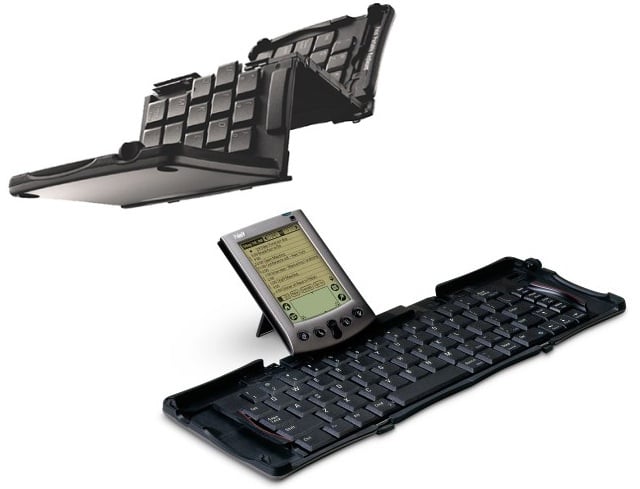
OMG. There are adapters for this?
https://hackadaycom.files.wordpress.com/2015/04/palmkeyboard...

Well...my smartphone is getting powerful (and connectable) enough that this could be workable - almost almost.
In the future, you will go out with a headset and a pair of gloves instead of your keyboard.
The future, as seen from early 1990s; banging your fingers into the table is somewhat underwhelming compared to the response of a keyboard. If the gloves could fix that with tactile feedback...
In the future, your computer will go out for you.
Can you elaborate your assumption little bit more ?
ThinkPads have indeed declined in quality. Especially the keyboards have become very fragile and break under normal wear in a few years if not less. Replacing them at that point is normally impossible since that spare part is no longer in stock. Sad :(
Not on the good models such as T and X series.
[deleted]