Ask HN: Where are the simple Git GUIs?
34 comments
I use git graph (VS Code Extension). It is very visual and you can interact with git functionality through the tree visualisation itself.
It shows the git tree and includes a diff mechanism. Used it since 2019 after moving from TortoiseHg.
Demo Gif: https://github.com/mhutchie/vscode-git-graph/raw/master/reso...
Extension Page: https://marketplace.visualstudio.com/items?itemName=mhutchie...
It shows the git tree and includes a diff mechanism. Used it since 2019 after moving from TortoiseHg.
Demo Gif: https://github.com/mhutchie/vscode-git-graph/raw/master/reso...

Extension Page: https://marketplace.visualstudio.com/items?itemName=mhutchie...
I use this + GitLens (which also appears in the demo gif you link, but collapsed).
Jetbrains IDEs (IDEA, PHPStorm, Goland,...) have the best GUI for git that I'm aware of.
I'm a proficient CLI user, but the IDE's GUI really helps with diffs, partial commits, and is all around very convenient to use.
I'm a proficient CLI user, but the IDE's GUI really helps with diffs, partial commits, and is all around very convenient to use.
The best visual diff tool ever !
I mostly use the terminal, but for when I need to find stuff I like Sublime Merge.
https://www.sublimemerge.com/
https://www.sublimemerge.com/
I can recommend https://www.sublimemerge.com
It's fast and nice to work with. I actually use it in conjunction with the command line (zsh w/ autocomplete so I normally only type the first one or two letters of each recurrent command to get the completion, hit return, done) specifically to pick those portions of each file that I want to go into a given commit. Occasionally I use some more advanced features like file history.
It's fast and nice to work with. I actually use it in conjunction with the command line (zsh w/ autocomplete so I normally only type the first one or two letters of each recurrent command to get the completion, hit return, done) specifically to pick those portions of each file that I want to go into a given commit. Occasionally I use some more advanced features like file history.
I use mostly TortoiseGit, https://tortoisegit.org.
As easy as it gets, no Electron boilerplate, full Windows native executable.
As easy as it gets, no Electron boilerplate, full Windows native executable.
It's too bad there's no cross-platform equivalent - although it might be hard as it's context menu based
I learned git on tortoise git. It's definitely a good and simple option if you're on windows.
For windows I use Git Extensions; http://gitextensions.github.io/.
Really simple UI.
Nice to see something made with C# (as someone who codes mostly in C#/VS).
Check out lazygit https://github.com/jesseduffield/lazygit
Seconding this. After trying out a bunch of git guis and being unsatisfied with all of them, I recently discovered lazygit and I absolutely love it. Simple, lightweight, doesn't get in your way, doesn't hide things from you, just an absolute pleasure to use.
I am using https://www.git-tower.com.
I like git tower. But I don’t like their annual subscription. I guess if you were in a corporate setting, you could expense it.
If you're a Mac user, try GitX. Pros include:
  1. browsing/searching/sorting commit histories
  2. diffs (what you'd expect from a GUI)
  3. super lightweight
  1. can't resolve conflicts (but it makes easy commits easier)
  2. last release was 2014 (but it's perfectly usable as is)
I use mostly GitExtensions, see: https://github.com/gitextensions/gitextensions
Screenshot: https://gitextensions.github.io/images/commitlog205.png
Edit: added screenshot
Screenshot: https://gitextensions.github.io/images/commitlog205.png
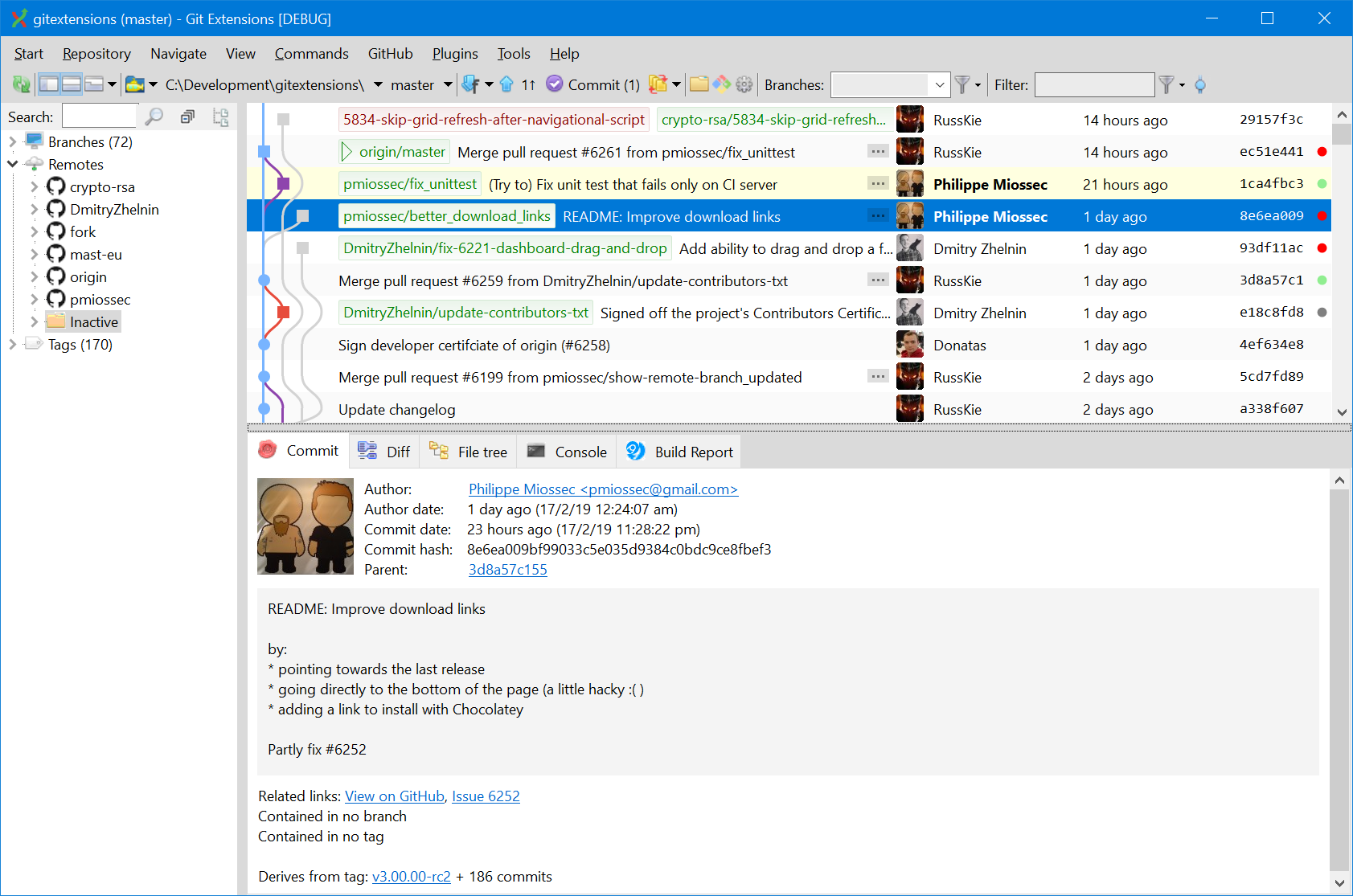
Edit: added screenshot
I guess you could rapidly run through all the options here : just examine the screenshot of each product to gauge its UI complexity.
https://alternativeto.net/category/developer-tools/git-clien...
https://alternativeto.net/category/developer-tools/git-clien...
Probably not an answer to your question, but take a look at gitk. It's more for visualization, but it comes installed with git for most distributions. I've found it's incredibly helpful for teaching people the commit tree model, or even just looking at all the diffs across a branch
I use gitui. Its a TUI written in rust and it is great. I mainly use it for looking at the gitlog, committing, and pushing.
https://github.com/extrawurst/gitui
https://github.com/extrawurst/gitui
There are a lot of recommendations here. I have never used any version control system but I feel a needness to have one for my config files such as .vimrc . Any recommentations of what should I consider for minimalization of learning process?
It uses git under the covers but my tool for dotfile management abstracts over it so you rarely have to interact unless you want to:
https://github.com/chasinglogic/dfm
https://github.com/chasinglogic/dfm
>I have never used any version control system
How?
Anway, git is the most standralized one, hence you should try learning it. You can look at git-scm docs, experience with some repositories, use your own repo and things that make you use git.
How?
Anway, git is the most standralized one, hence you should try learning it. You can look at git-scm docs, experience with some repositories, use your own repo and things that make you use git.
My recommendation is yadm, which is built on top of git
I think Sourcetree is a very nice gui for git. https://www.sourcetreeapp.com/
Gitbox used to be really nice.. http://gitboxapp.com/, but I just use VSCode
I still use Gitbox today. I think it is due for an upgrade!
Fork (https://fork.dev) is my go-to. One time payment, super clear UI.
gitk, git_gui, but i used them on linux, not sure how well they would run on other platforms
Haven't used on Linux, but they work great on Windows and Mac.
Try Magit.
Emacs' magit is the best out there.
My work process is this: use atoms ui (its very simple) for 99% of my git needs, and in the 1% I need something else, I use the CLI. I don't want every single git feature fit into ui elements on a single screen. I don't want to use the CLI 100%, because its just simply slower, and takes more effort, for most things.
Atom git gui screenshot: https://i.imgur.com/33EkpTu.png
Git kraken screenshot (for comparison): https://www.gitkraken.com/wp-content/uploads/2022/03/index-thumbnail.png