Show HN: I made a tool to HTTPS your localhost(lokal.so)
lokal.so
Show HN: I made a tool to HTTPS your localhost
https://lokal.so/
54 comments
Congratulations on the launch! How does the remote -> local tunneling work? The docs you linked are a little unclear to me.
How does this differ from something like Localcan, which seems to offer the same features? https://www.localcan.com/
For what it's worth, I'll mention that I have an open-source application, Localias [0], that does the same local https development + mDNS support for HTTP/TCP/UDP traffic. Localias doesn't support traffic inspection or remote -> local tunneling, but it's open source, built on caddy, and works on mac/linux/wsl2. It's a statically built binary and you can share your configs with your whole dev team in your git repo.
[0] https://github.com/peterldowns/localias
How does this differ from something like Localcan, which seems to offer the same features? https://www.localcan.com/
For what it's worth, I'll mention that I have an open-source application, Localias [0], that does the same local https development + mDNS support for HTTP/TCP/UDP traffic. Localias doesn't support traffic inspection or remote -> local tunneling, but it's open source, built on caddy, and works on mac/linux/wsl2. It's a statically built binary and you can share your configs with your whole dev team in your git repo.
[0] https://github.com/peterldowns/localias
hi, I do have make premium comparison here with another vendor:
https://docs.google.com/spreadsheets/d/1BzvPRA2ZK5ekSaTV5vyr...
https://docs.google.com/spreadsheets/d/1BzvPRA2ZK5ekSaTV5vyr...
it is indeed has .local address, but does it have built-in auth plugin? request and response manipulation?, AI Assistant, JSON debugging capabilities and even the File Preview feature?, I don't think they can compete with Lokal right now
Why not just self sign a local cert? Its really easy to do (ask an AI for a relevant example in your language of choice)
Yep, this is what I do using mkcert [0] and it works great. One-time setup of 15m to install certs on your dev devices.
[0] https://github.com/FiloSottile/mkcert
[0] https://github.com/FiloSottile/mkcert
+1 for mkcert. You can juggle all the openssl dance moves if you want, it’s a decent learning exercise. After you’ve done that once though, and if you only need it for local dev… yeah just use mkcert
I recently found that Tailscale supports procuring real Let's Encrypt certificates for the machines on your private network. So all you have to do on the clients is install Tailscale, which I think is a little easier than trusting self-signed certificates.
You can also do this yourself with a domain you own and control. I have done it as well when I wanted SSL on my local LAN. My lan is also assigned a real domain so applying a cert is easy to any of my machines.
interesting found, while the primary purpose of tailscale are easier P2P connection, I might take a look how this real Let's Encrypt certificate are being used for .local/custom FQDN and implement it on Lokal, appreciate it.
To do it they assign the host a subdomain under .ts.net. But your private host isn't exposed to the public internet, I assume they just have a dummy host there to respond to the ACME challenge from Let's Encrypt. When you have the Tailscale VPN installed, I assume it overrides the DNS for ___.ts.net to point to the private IP of your local host.
https://tailscale.com/blog/tls-certs
Go implementation at the end of article.
Go implementation at the end of article.
One downside of self-signed certs is that browsers will to upgrade all localhost ports to HTTPS thanks to HSTS. In practical terms, that meant:
- we needed to upgrade all dev servers to serve both HTTPS and HTTP. - we downgraded server to server comms to HTTP (something about invalid cert chain)
I think the ideal solution is to use “local” domain names but that requires a DNS resolver (via Tailscale or similar).
- we needed to upgrade all dev servers to serve both HTTPS and HTTP. - we downgraded server to server comms to HTTP (something about invalid cert chain)
I think the ideal solution is to use “local” domain names but that requires a DNS resolver (via Tailscale or similar).
I run some software on a raspberry pi at home. This pattern works very well for me:
- services exposed via caddy(configured to use my domain on cloudflare for SSL)
- my lan dns resolver(adgaurd home) is configured to rewrite these domains to local IP. Specifically, the rewrite rule looks like `homeassistant.mydomain.com -> rpi.lan`
- Cloudflare tunnel on the rpi for services I want to access outside. I've it configured to require Google auth via cloudflare zero trust(free)
The neat part of this setup is that when I access a service when I'm at home, it works as expected completely locally including https.
If I try to access the service through the public internet, it will still work on the exact same domain and also have proper auth through cloudflare. This way I can access anything on the internet from my home server without worrying about security.
Cloudflare tunnel also offers some other cool things like ssh on your browser(which again uses the previously mentioned Google auth) if you need it.
- services exposed via caddy(configured to use my domain on cloudflare for SSL)
- my lan dns resolver(adgaurd home) is configured to rewrite these domains to local IP. Specifically, the rewrite rule looks like `homeassistant.mydomain.com -> rpi.lan`
- Cloudflare tunnel on the rpi for services I want to access outside. I've it configured to require Google auth via cloudflare zero trust(free)
The neat part of this setup is that when I access a service when I'm at home, it works as expected completely locally including https.
If I try to access the service through the public internet, it will still work on the exact same domain and also have proper auth through cloudflare. This way I can access anything on the internet from my home server without worrying about security.
Cloudflare tunnel also offers some other cool things like ssh on your browser(which again uses the previously mentioned Google auth) if you need it.
Here's a batteries-included local-first dev-environment which does that in order to compartmentalize your credentials:
https://github.com/legobeat/l7-devenv
Something like Lokal might till be useful here to facilitate remote collaboration by providing a tunnel (ie I can connect to your local session behind NAT without you opening ports or connect to VPNs etc).
https://github.com/legobeat/l7-devenv
Something like Lokal might till be useful here to facilitate remote collaboration by providing a tunnel (ie I can connect to your local session behind NAT without you opening ports or connect to VPNs etc).
interesting use case....
It's not easy to trust them imo. Browser (rightfully) make it scary sounding, and offhand i don't expect most people know how to install them without the scary warnings (i don't, despite running some locally).
Or why not just use a real cert? Getting a wildcard cert is trivial, as is creating a locally resolving DNS record for your local machine.
For tunneling, how is this different / better than ssh -L?
For tunneling, how is this different / better than ssh -L?
I don't think real certificate provider could work with .local mDNS address as they need to do some public verification going on
the second answer is, ssh -L are just pretty slow on concurrent request, I might think it's just bloat as there is so much thing happen on ssh that not required for tunneling, also it doesn't do vhost natively as on Lokal you can just choose which domain you want to use, and it's just works...
the second answer is, ssh -L are just pretty slow on concurrent request, I might think it's just bloat as there is so much thing happen on ssh that not required for tunneling, also it doesn't do vhost natively as on Lokal you can just choose which domain you want to use, and it's just works...
You can easily have localhost.whateverdomain.whatever for any and all domains and still use virtualhosting. Seems like a solution looking for a problem.
yes, sure thing it's really easy to do and makes your focus changed on making local https working instead of building your real product
https://chatgpt.com/share/9cc6ab14-e777-45a6-92b8-c58bbfb433...
https://chatgpt.com/share/9cc6ab14-e777-45a6-92b8-c58bbfb433...
This product seems similar to Ngrok and some other solutions. How does this product differentiate itself from everyone else?
Hi, I make detailed comparison on excel about this question
https://docs.google.com/spreadsheets/d/1BzvPRA2ZK5ekSaTV5vyr...
basically ngrok's traffic inspection is only available by last month, right, they are old player but pretty late on shipping things.
also, we had an AI Assistant.
https://docs.google.com/spreadsheets/d/1BzvPRA2ZK5ekSaTV5vyr...
basically ngrok's traffic inspection is only available by last month, right, they are old player but pretty late on shipping things.
also, we had an AI Assistant.
Please share this information in a non Google, non Microsoft format. Perhaps make it a plain HTML page or PDF and link it directly from your primary website.
I see, thank you for your suggestion
Here I made temporary image version (basically screenshotting the google sheet)
https://download.lokal.so/vendor-comparison.png
Here I made temporary image version (basically screenshotting the google sheet)
https://download.lokal.so/vendor-comparison.png
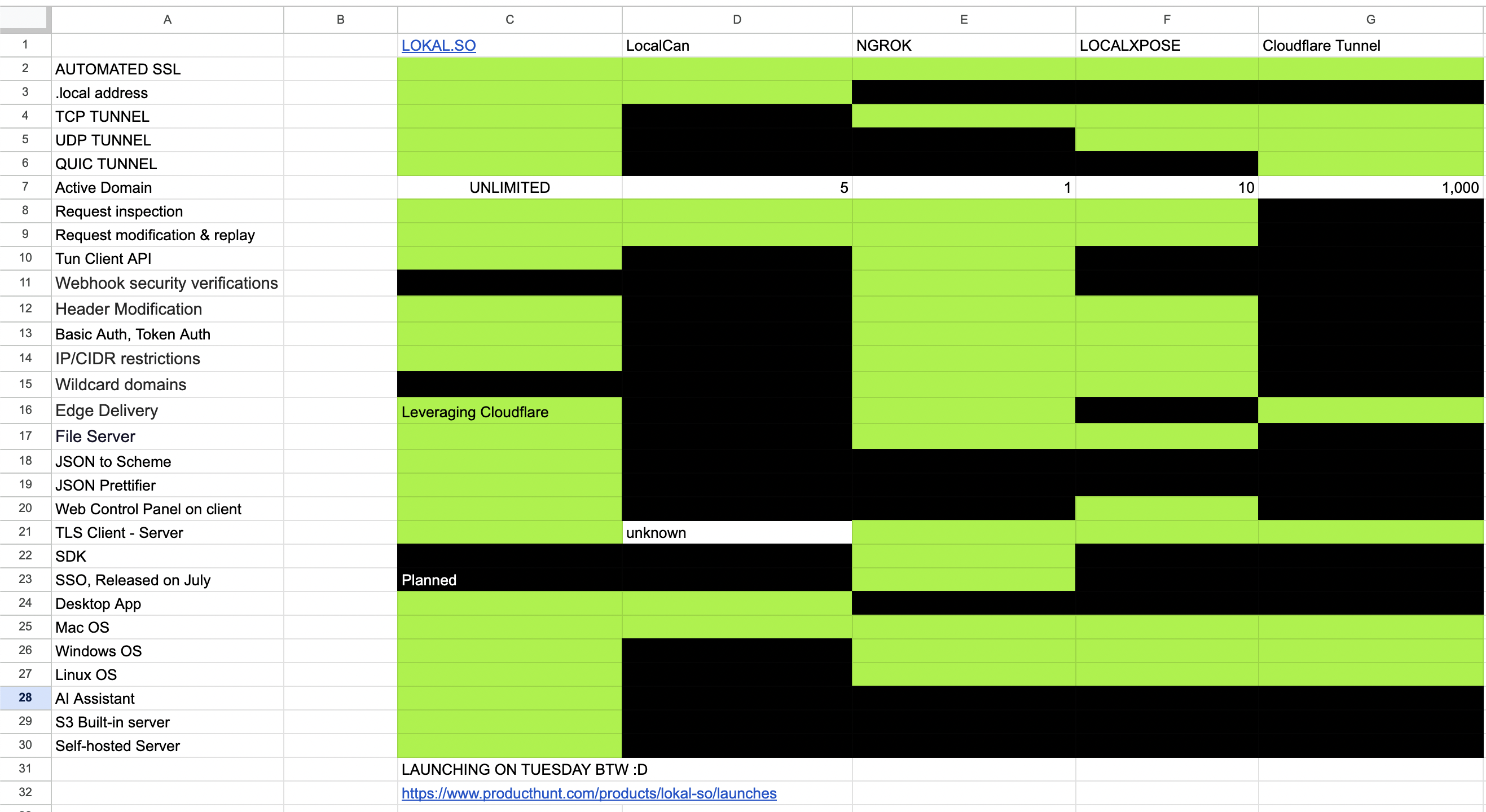
Having a .local suffix doesn't really seem like a feature.
Also, I still don't see why this is better than ngrok. If anything, I'd turn it down because there's functionality (an AI assistant) that I don't want.
Thanks.
Shouldn't the watchtower docker config be configured to only monitor and update the lokal-server container and not every container on the host?
WATCHTOWER_LABEL_ENABLE env set to true on watchtower
com.centurylinklabs.watchtower.enable label set to true on lokal-server
WATCHTOWER_LABEL_ENABLE env set to true on watchtower
com.centurylinklabs.watchtower.enable label set to true on lokal-server
you are correct, appreciate it for the report , I will change the docs on self hosted deployment.
You lost me at "AI assistant help".
Congratulations! We all know how difficult it is to launch a working product. Looks like you are trying something similar to what we do at https://pinggy.io/
LAN-Wide Accessible .local address looks like a super useful feature!
LAN-Wide Accessible .local address looks like a super useful feature!
Won't this break Bonjour/Zeroconf .local announcements from hosts? Should you be using .local at all?
no sir, the default .local are still accessible
on Macbook, you could check General > Sharing > scroll the bottom and you will see something like RUBIs-MacBook-Pro.local, and it's still working.
on Macbook, you could check General > Sharing > scroll the bottom and you will see something like RUBIs-MacBook-Pro.local, and it's still working.
Looks good.
I've been using Cloudflare's thing ("tunnel", I think) for the basic functionality, but I see this does additional things. If I ever want to do those things (or I just decide I want to try something different) I'll keep this in mind.
I've been using Cloudflare's thing ("tunnel", I think) for the basic functionality, but I see this does additional things. If I ever want to do those things (or I just decide I want to try something different) I'll keep this in mind.
What all can the "AI Assistant" do?
I want it to be able to receive command to resend and modify a request
but I will never get it into launch if all I thinking is to add more features
so currently it's only providing related information of inspected request to the chat session, so our user don't manually copying context again to a chatgpt or similar.
but I will never get it into launch if all I thinking is to add more features
so currently it's only providing related information of inspected request to the chat session, so our user don't manually copying context again to a chatgpt or similar.
Intriguing, but I think VS Code's built in GitHub tunneling support is enough for me.
The page is blank for me. Fennec on android
Great video!
thank you :)
I'm trying to record my self talking while operating something on my computer, I give up after 20+ retake, and end up pivoting to this kind of video.
I'm trying to record my self talking while operating something on my computer, I give up after 20+ retake, and end up pivoting to this kind of video.
congrats on the launch!
After looking at your web page and your HN post for 1 minute each, I have no clue what your software is doig, where it is running, whether it is open source, how much a subscription costs etc.
It's also confusing to me that the title says HTTPS, the post says HTTP.
The use of HTTPS in the HN post title as a verb makes it incomprehensible for me. Are you planning an HTTPS-basef network attack on the computers of all HN users? Probably not. But then why do you suggest it in the title? Why not write a title which is easy to understand, using common verbs?
It's also confusing to me that the title says HTTPS, the post says HTTP.
The use of HTTPS in the HN post title as a verb makes it incomprehensible for me. Are you planning an HTTPS-basef network attack on the computers of all HN users? Probably not. But then why do you suggest it in the title? Why not write a title which is easy to understand, using common verbs?
You forgot the "AI Assistant help" part.
I was actually interested in the tool, but closed the page as soon as I saw this.
I don't need any AI from a tool that "gives me HTTPS on localhost". If I need AI Assistant, I know where to go. Thanks.
I was actually interested in the tool, but closed the page as soon as I saw this.
I don't need any AI from a tool that "gives me HTTPS on localhost". If I need AI Assistant, I know where to go. Thanks.
I'm sorry If any of my narration makes you misunderstood
the AI did not give you https on localhost
the AI only assisting based on your question
the AI did not give you https on localhost
the AI only assisting based on your question
pardon me for my bad english, english was not my native language and yet I forgot to use AI to correct my title
basically the title only say 10% of what this software can do, the other feature as visible on Lokal.so site
people might call it ngrok alternative, well it could, but ngrok doesn't have features like Lokal's do
so what's this software basically do is:
Share: your localhost with Public and https .local Address Debug: What's Incoming, Replay without triggering real WebHook Develop: further with AI Assistant help!
if you still don't understand about what this software could do, I'm afraid I'm running out of word to explain this on your-own terms.
appreciate it
basically the title only say 10% of what this software can do, the other feature as visible on Lokal.so site
people might call it ngrok alternative, well it could, but ngrok doesn't have features like Lokal's do
so what's this software basically do is:
Share: your localhost with Public and https .local Address Debug: What's Incoming, Replay without triggering real WebHook Develop: further with AI Assistant help!
if you still don't understand about what this software could do, I'm afraid I'm running out of word to explain this on your-own terms.
appreciate it
[deleted]
imvetri(1)
Lokal is a software for Tunneling, Local Development, and HTTP Debugging, It's support HTTP, TCP and UDP Tunnel.
The different with other tunneling solution is that Lokal has mDNS support with https enabled by default, while other might be only offer public-facing tunnel service.
On the latest version 0.3.0, Lokal support Self-hosted Lokal Tunnel Server, which allow you to use your own domain and your own VPS, allow you to have Premium but self-hosted Tunneling Solution.
Download -> Lokal.so/download Self-hosting Tutorial -> https://docs.lokal.so/lokal-server/installation/