Run GUI applications and desktops in Docker(github.com)
github.com
Run GUI applications and desktops in Docker
https://github.com/mviereck/x11docker
18 comments
> It probably has a lot of security and convenience functionality.
A shell script with 9000 lines probably has a lot of security issues..
A shell script with 9000 lines probably has a lot of security issues..
I am just in awe. Good Bash code is art to me!
The wiki of x11docker describes some short setups without x11docker, too: https://github.com/mviereck/x11docker/wiki/Short-setups-to-p...
For Linux, there's also flatpak that runs GUI applications inside _containers_.
https://flathub.org/home
https://flathub.org/home
While I think it is great to explore using containers for isolate desktop apps, that is my understanding of what tools like Flatpak and snapd does already. I'd love to see them implemented into the standard container ecosystem though. However, this is limited to Xorg (which is fine for most applications), however there is growing native support for Wayland.
>However, this is limited to Xorg (which is fine for most applications), however there is growing native support for Wayland.
The principle of nesting Xephyr inside the host X server easily extends to nesting cage or sway or weston inside the host's wayland compositor.
The principle of nesting Xephyr inside the host X server easily extends to nesting cage or sway or weston inside the host's wayland compositor.
For certain Wayland implementations (GNOME) that is not necessary, as there are no privileged interfaces that are exposed over wayland. The privileged interfaces are part of the flatpak portal which are filtered using a d-bus proxy. The biggest security worry you might have there is the GPU, which you need to expose to the sandbox if you want to run modern apps and games, etc. I don't know about other implementations, they could be doing other bad things over the wayland socket which break the flatpak and snap security.
x11docker supports Wayland, too. It can directly pass Wayland access from host to containers, or run containered Wayland applications on host X using a nested Weston window.
With the help of xpra it can run X application in container on a pure Wayland host.
I made this to contain a bunch of graphical apps used for gameboy-development: https://github.com/konsumer/docker-gb-dev
It has wine and some old windows-only apps. I took a different approach, and used a VNC server. Not quite as fast, but doesn't require the host to have an Xserver. I even include a little web-based VNC client, so no install is needed.
It has wine and some old windows-only apps. I took a different approach, and used a VNC server. Not quite as fast, but doesn't require the host to have an Xserver. I even include a little web-based VNC client, so no install is needed.
A simpler approach for Just one application can be found here: https://raymii.org/s/tutorials/Running_gnash_on_Ubuntu_20.04...
In that case it's legacy applications not available on newer distros.
In that case it's legacy applications not available on newer distros.
Is this UI https://raw.githubusercontent.com/mviereck/x11docker/screens... made in lazarus?
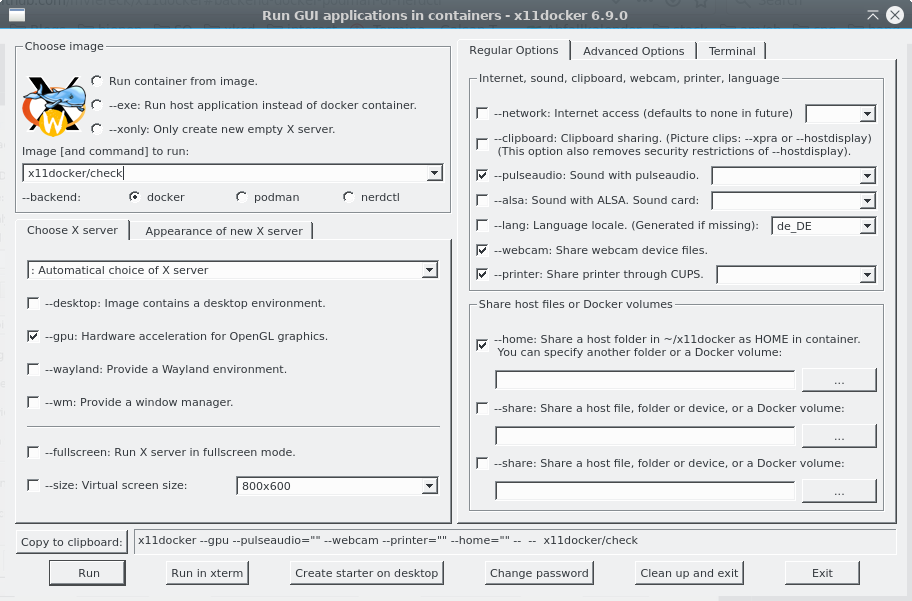
The readme says it uses kaptain. A tool to create qt-based GUIs for shell scripts.
https://github.com/mviereck/kaptain
https://github.com/mviereck/kaptain
Yesterday I tried another project names 'docker-wine', my goal was to run Frontpage 98. It didn't work so well. I guess I'll have to run a Windows 98 in a VM..
DOSBox might do the trick for you.
https://www.dosbox.com/comp_list.php?showID=3485&letter=W
https://www.dosbox.com/comp_list.php?showID=3485&letter=W
Is there anyway to pass exclusive access to a physical display to a docker container? I've been wanting to have this for a status display on some home servers.
Can it run & render openGL contexts as well?
Yes, you can pass graphics card to the container.
I used to run Steam games in LXC containers.
It probably has a lot of security and convenience functionality.
A minimal approach to run graphical applications inside a Docker container is this one-liner:
docker run -it --rm -e DISPLAY --net=host -v $XAUTHORITY:/root/.Xauthority -v /tmp/.X11-unix:/tmp/.X11-unix debian:11-slim
Then inside the container, run:
Now Firefox runs inside the container and you can use it.